Skip to content
KadePayGet started

KADEPAY FOR BARBERS & BARBERSHOPS

The app for barbers who would rather cut than chase payments.

Booked fades, Saturday walk-ins and the regular who sits down every other Thursday all end the same way: somebody has to pay. KadePay puts booking requests, chair-side QR and Tap to Pay, no-show protection and client notes on your phone, whether you own the shop or rent the booth.

Pay-As-You-Go starts at $0 per month. Usage and payment fees apply.

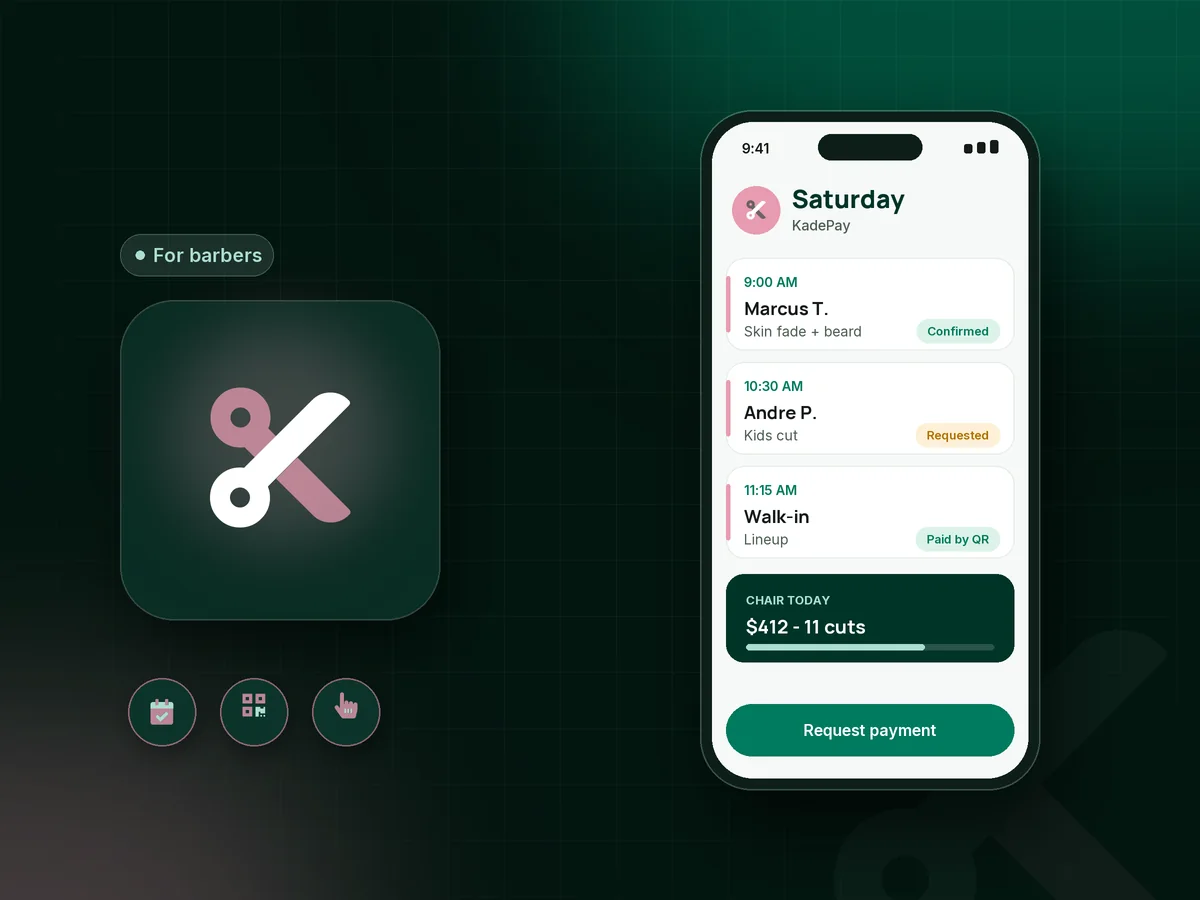
Illustration of an app for barbers showing a Saturday chair schedule with a booked skin fade, a kids cut and a walk-in paid by QR

Sound familiar?

Your chair is booked. Your money should be too.

Barbering runs on regulars, walk-ins and word of mouth, and the money side rarely keeps pace with the clippers. Here is where barbers say the day leaks cash, and how KadePay closes each gap.

01

Walk-ins and booked cuts fighting over the same chair

A walk-in sits down at 10:20, your 10:30 fade shows up early, and now somebody is waiting and somebody is annoyed.

With KadePay

Share a booking link with your real cut times, like 30 minutes for a lineup and 45 for a fade with beard. Clients request a slot, you confirm it, and time blocks keep your walk-in hours open.

Appointment booking
02

The Saturday no-show who never answers the text

Prime Saturday slots go to clients who ghost, and the $45 cut you turned two walk-ins away for is simply gone.

With KadePay

Have new clients sign your policy and authorize a card on file. When a booked cut is missed, charge the barber no-show fee your signed policy describes, and the client gets a receipt for it.

Card on file
03

Booth rent is due whether the chair was busy or not

As a booth renter you pay the shop every week, so every cut you finish has to land in your account, not in somebody else's register.

With KadePay

Run your own KadePay account from your phone. Print your own Pay Direct QR for your station or use Tap to Pay, and download your transactions for your bookkeeper when the quarter ends.

Tap to Pay and card readers
04

Clients who say 'I'll Zelle you' and then forget

Cash is rare, cards come out slowly, and half the shop pays by app. Keeping track of who actually paid becomes a second job.

With KadePay

Take cards, Apple Pay and Google Pay at the chair, and record Venmo or Zelle payments against the client so the cut shows as paid. KadePay charges no fee on recorded Venmo or Zelle payments.

Venmo, Zelle and cards
05

Regulars every two weeks, paying from scratch every visit

Your best clients sit down twice a month like clockwork, yet each checkout starts over with a card, a tip and small talk about the total.

With KadePay

Offer a haircut membership as a monthly recurring bill on Team or Pro, or sell a 10-cut package and record each cut as it is used. Booking each visit stays separate.

Recurring billing

How it fits your week

A day behind the chair with KadePay

  1. The link lives in your bio

    Put one Flex Link in your Instagram bio and on a card at the mirror. Clients pick a fade, taper or beard trim and request a time that fits your book.

  2. You confirm between cuts

    Check new requests when you put the clippers down and confirm the ones that fit. Automatic reminders nudge booked clients before their chair time.

  3. Walk-ins still welcome

    A walk-in does not need an account. Finish the cut, then they scan the QR at your station, enter the agreed price with the tip, and pay from their own phone.

  4. Booked clients pay at the chair

    Tap their card on your compatible phone, charge the saved card they authorized, or text a payment link if they are already halfway to the car.

  5. Notes for the next cut

    Save the guard numbers, the part side and a photo of the finished fade on the client profile, so the next visit starts where this one ended.

Every way your clients pay

  • Visa
  • Mastercard
  • American Express
  • Discover
  • Apple Pay
  • Google Pay
  • Tap to Pay
  • ACH bank transfer
  • Affirm, where eligible
  • Venmo
  • Zelle
  • QR codes
  • Text and email links

Availability depends on your account setup and eligibility. You confirm Venmo and Zelle payments after checking they arrived.

KadePay for barbers

What makes the best app for barbers who take walk-ins and appointments

Most shops run two systems at once: the appointment book and the bench by the door. A good barber booking app should respect both. With KadePay, clients request their cut from your link and you confirm it, while walk-ins never need an account. They scan the QR at your station or tap a card on your phone, and the payment is recorded the same way either way.

Barbershop payments get messy when every chair handles money differently. A booth renter keeps a separate KadePay account and takes payment into it, while a shop owner on Team or Pro can add barbers as team members with their own permissions. Tap to Pay for barbers works on a compatible phone after payment setup, and QR code payments for barbers need nothing more than a printed code taped to the mirror.

Barber deposits and no-show fees work best when they are agreed in writing. Put your policy in a short form clients sign on their phone, send first-time clients a deposit link when you confirm their cut, and keep a card on file for regulars. A haircut membership on a recurring bill rewards the clients who keep your chair busy every two weeks.

CLEAR ANSWERS

Barbers & barbershops: your questions, answered.

What is the best app for barbers who take walk-ins and appointments?

Look for one that handles both without a second device. KadePay lets booked clients request a time that you confirm, and lets walk-ins pay by scanning your station QR or tapping a card on your phone. KadePay does not manage the walk-in line itself, so the bench keeps working the way it does today.

How do I charge a no-show fee as a barber?

Write the fee into a policy form the client signs, and ask them to authorize a card on file. If they miss the cut, charge the fee your signed policy describes. For first-time clients, many barbers prefer a small deposit link sent when the booking is confirmed.

Can a booth renter take payments separately from the shop?

Yes. Open your own KadePay account, finish payment setup, and use your own QR, payment links or Tap to Pay. Your clients, notes and transactions stay with your account. If you also run a second business, several businesses can sit under one login.

Do I need a card reader to take cards at the chair?

Not on a compatible iPhone or Android phone with the KadePay app once payment setup is complete. Tap to Pay accepts contactless cards, Apple Pay and Google Pay. Card readers can also be purchased if you prefer a device on the counter.

Can I sell haircut memberships or prepaid cuts?

Yes. On Team or Pro, set up a monthly recurring bill for a membership, such as two cuts a month for $70. Any plan can sell a package of 5 or 10 cuts and record each one as it is used. Each visit is still booked separately.

How much does KadePay cost for a barber?

Pay-As-You-Go starts at $0 per month for a single chair, and payment and usage fees apply. Team at $10 per month adds team members and recurring bills, and Pro is $35 per month. Check the pricing page for current fees before you pick a plan.

YOUR WORK COMES FIRST

Make room for more clients.

Get started for free

CHOOSING YOUR BUSINESS TOOLS

Compare the workflow before you choose.

Explore documented features, cost questions and relevant alternatives.