
Pay-As-You-Go
$0/month
One user
60 appointment bookings included per month
KADEPAY FOR NAIL SALONS
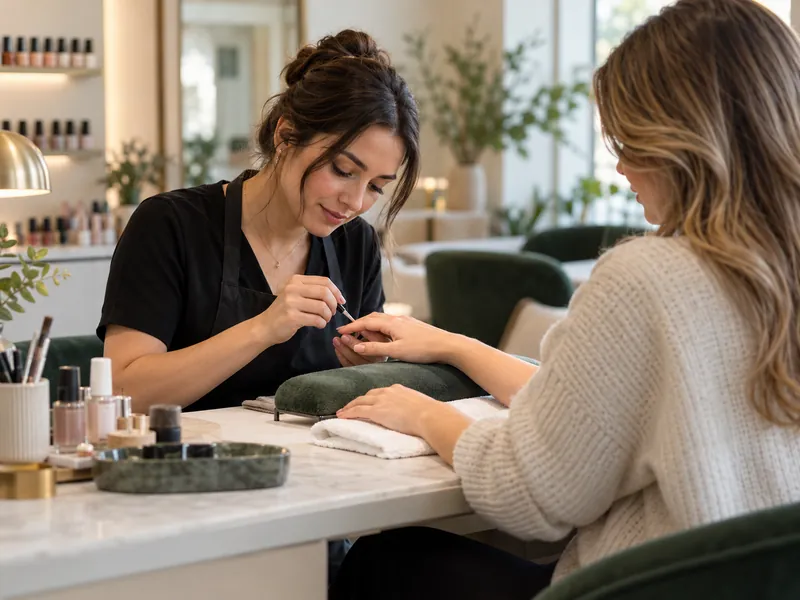
Give your nail business one place for appointment requests, client photos, consent forms and payments. KadePay is a nail salon booking app for independent nail techs and salon teams: clients request a service and time, and you review and confirm the visit.
One user. $0 monthly plan. 60 appointment bookings included per month; $0.15 each after. Payment and other usage fees apply.
APPOINTMENT PLANS AT A GLANCE
Start with the number of users and monthly bookings your business needs.
$0/month
One user
60 appointment bookings included per month
$10/month
Multiple users
60 appointment bookings included per month
$35/month
Multiple users
150 appointment bookings included per month
USD. Additional appointment bookings are $0.15 each. Payment processing and applicable usage fees are separate. Published plan terms and account eligibility apply.
Compare all plans and feesSet separate services and durations for a gel manicure, new set, refill or removal. Share your booking link from your social profile so clients can request the service and time.
For example Review a refill request and allow enough time for the design before confirming the visit.
Keep customer inspiration photos and selected files in Gallery, with private staff notes separate.
For example Open the last set before discussing the refill.
Sell a manicure package, track redemptions and book appointments separately.
For example Four visits purchased, one redeemed, three left to use.
START WITH SOMETHING USEFUL
Choose the workflow that gives you time back today.
A refill, a new set and a repeat visit each need the right details. KadePay connects the appointment request, client record and payment without turning them into separate conversations.
Share a calendar link in your social profile or send it to a returning client. Set up the services, provider, duration and available hours first. The client requests a time; you review and confirm it before the visit.
Keep private staff notes and inspiration photos with the customer, and share an intake or consent form when needed. Clients sign in and complete their own forms and signatures on their phones.
Display your Pay Direct QR for the client to enter the agreed total, or use compatible-phone Tap to Pay after payment setup. If you sell a manicure package, track the remaining visits and record each redemption; schedule each appointment separately.
GUIDES FOR YOUR SPECIALTY
FROM THE FIRST SET TO THE NEXT REFILL
A new set, an infill and a removal need different appointment time and different context. Keep the requested service clear, find the chosen inspiration before you begin, and make payment a step you can verify before resetting the station.
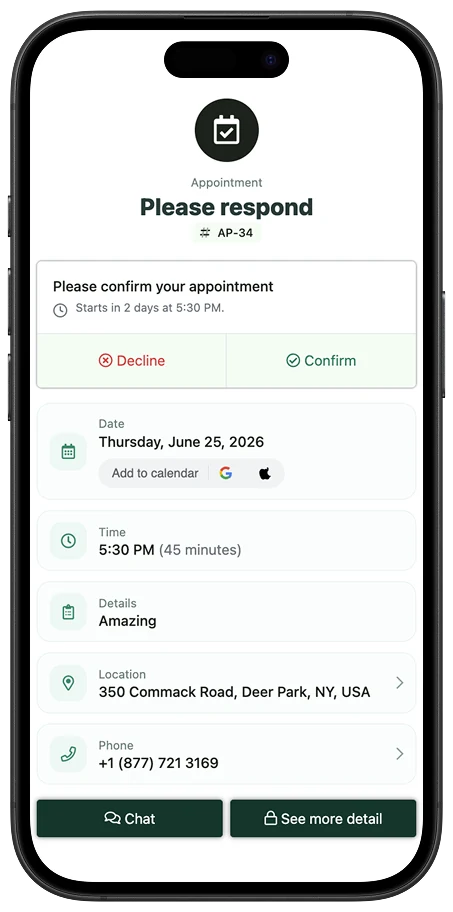
Set separate services and durations for the visits you offer. A booking link lets the client request a new set, refill or removal; your team reviews and confirms the appointment.
Explore the featureOrganize reference images in the customer Gallery and record private service preferences in staff notes. If you use an intake or consent form, the client signs in and completes it on their own phone.
Explore the featureCreate the agreed bill or offer Pay Direct QR at the station. A client can pay from their phone; staff check the transaction result. External Venmo or Zelle transfers are verified and recorded separately.
Explore the featureILLUSTRATIVE WORKED EXAMPLE
An illustrative visit for a fictional returning client who wants the same shape with a new design.
The client requests your refill service. Check the time needed for the design and any additional service before you confirm the slot.
Look at the selected reference photo and private notes about shape or finish. Ask the client to complete any form your business requires rather than completing a signature for them.
Create the agreed service charge after confirming any design additions. Let the client use the bill link or another enabled payment option, then verify the transaction.
Save the new preference for the next refill. If this visit uses a prepaid manicure package, verify the purchase/payment details and record its redemption; book the next appointment separately.
Fictional service example. Staff notes, customer Gallery sharing, bill attachments and package redemptions are separate actions.
PUT IT INTO PRACTICE
Start with one practical change you can use in your business.
CLEAR ANSWERS
The single-user Pay-As-You-Go plan is $0 per month and includes 60 appointment bookings per month. Additional bookings are $0.15 each. Team is $10 per month with multiple users and 60 included bookings; Pro is $35 per month with multiple users and 150 included bookings. Payment processing and applicable usage fees are separate.
Set the services, provider, duration and available hours, then share the link. A client requests a service and time. You review the tentative request before confirming the appointment; the request itself does not create a bill or take payment.
Yes. Share an appointment link for your configured services and availability. Clients request a time and you review and confirm it. Compare the plans if your salon needs multiple users.
Compatible iPhone and Android phones can use Tap to Pay in the KadePay app after eligible payment setup. You can also share a payment link or Pay Direct QR. Processing and usage fees still apply.
Yes. Send a form link; clients sign in and complete their own signed answers.
Describe the package in the authenticated editor. Review the draft, price, fee details and booking instructions before saving.
Use separate services when they require different durations or preparation. This makes the client request more useful for your review. Confirm any design additions and the required time before accepting the appointment.
Customer Gallery folder permissions and private notes are separate. Give the client the appropriate folder access if you want them to upload a reference image; keep your internal service notes in the private staff area.
Check the actual transfer and confirm the client and agreed amount before recording it in KadePay. Zelle and Venmo transfers happen outside KadePay; recording one does not move the money or verify it automatically.
YOUR WORK COMES FIRST
CHOOSING YOUR BUSINESS TOOLS
Explore documented features, cost questions and relevant alternatives.
 Lash artists
 Brow artists & microblading
 Waxing studios
 Estheticians & skin care
 Day spas