Skip to content
KadePayGet started

KADEPAY FOR ELECTRICIANS

An electrician invoicing app that keeps up with your service calls.

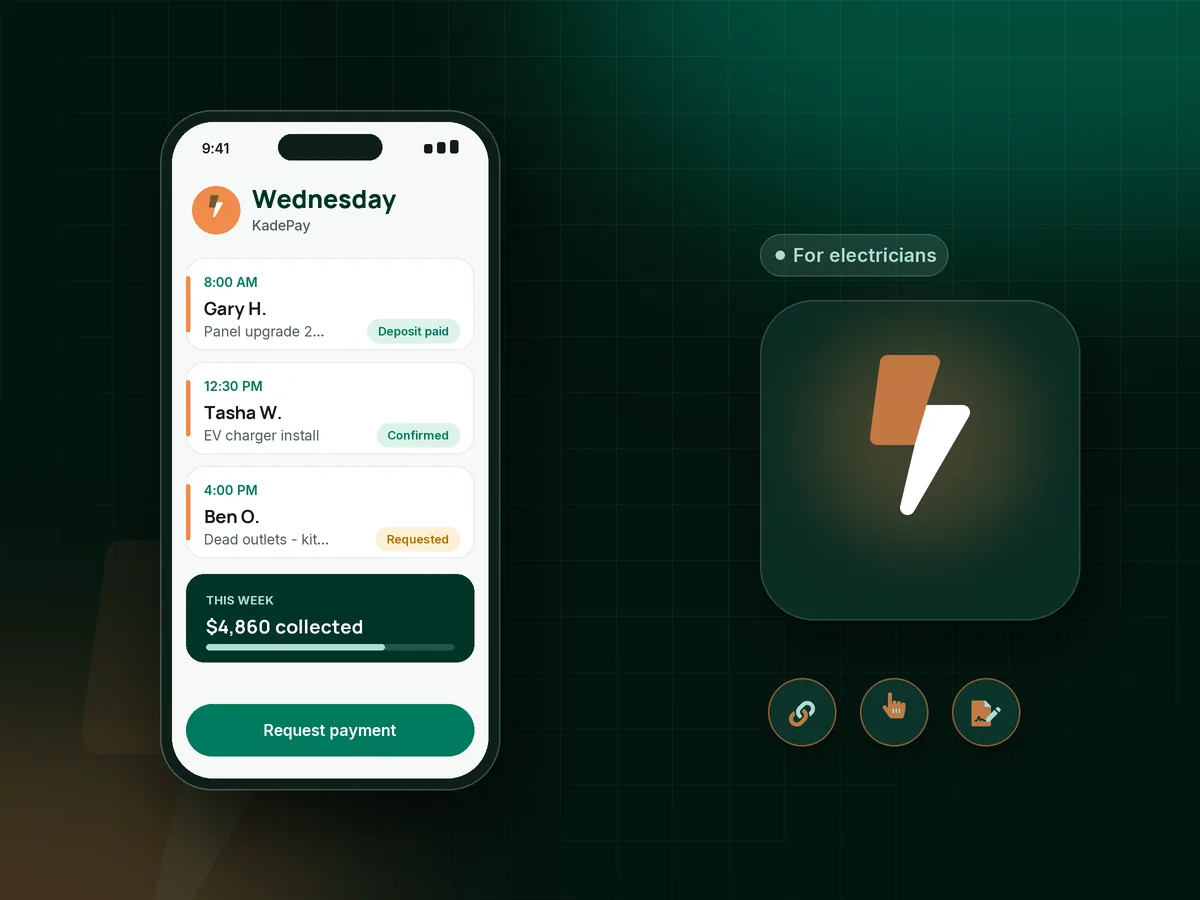
A tripped breaker call, a 200-amp panel swap and an EV charger rough-in can all land in one week, each billed differently. KadePay handles the money side: material deposits by link, bills with photos of the finished panel, Tap to Pay on a compatible phone, and notes on where the meter and subpanel are.

Pay-As-You-Go starts at $0 per month. Usage and payment fees apply.

Illustration of an electrician's day in the KadePay electrician invoicing app with a panel deposit, an EV charger job and a paid service call

Sound familiar?

Wire it right, then get paid for it the same day.

Electrical work runs on permits, inspections and material that has to be bought before the first wire is pulled. These are the money moments that slow electricians down, and how KadePay handles each one.

01

Fronting $900 of wire, breakers and a panel on your own card

Copper and gear prices keep climbing, and if the homeowner backs out after you bought the panel, the restocking fee comes out of your pocket.

With KadePay

Send a materials deposit with a fixed-amount link as soon as the job is approved. Pick up the gear once it shows paid, and credit the deposit on the final bill.

Payment links and QR codes
02

Service-call fees that customers argue about at the door

You drove 40 minutes, found the tripped GFCI in the garage in five, and now the customer thinks $129 is too much for flipping a switch.

With KadePay

State your service call fee in a short policy form the customer signs on their phone before the visit, so the charge is agreed before you ever open the panel cover.

Forms and signatures
03

Panel upgrades and rewires stuck on 'we'll think about it'

A $3,200 panel upgrade or a whole-house rewire is often needed, not wanted, and the price stalls the decision for months.

With KadePay

Offer a payment plan with agreed installments from a saved method, or let the customer apply for Affirm at checkout where eligible. ACH bank transfer works for those paying the balance in full.

Payment plans
04

Hunting for the subpanel and breaker labels on every return trip

The homeowner calls back a year later and nobody remembers which breaker feeds the hot tub or where the subpanel hides in the basement.

With KadePay

Keep panel location, breaker notes, permit numbers and the charger model in private notes on the customer profile, with photos of the labeled panel in a Gallery folder.

Customer profiles and notes
05

Final payment that waits until after the inspection

The work passed rough-in, final inspection is two weeks out, and the customer quietly decides not to pay anything until the inspector signs off.

With KadePay

Split the job into a deposit, a rough-in bill and a final bill, each sent by text with photos attached and reminders turned on, so every stage has its own clear amount.

Ways to get paid

How it fits your week

From the first call to the final inspection

  1. Request a visit

    The customer books through your website link and requests a time for flickering lights or a new circuit. You check the request against your week and confirm it.

  2. Paperwork on their phone

    They sign your work authorization and service call policy, and authorize a card on file if the job will run across several visits.

  3. Deposit before the supply house

    Send a fixed-amount deposit link for the panel, breakers or charger. Buy materials once the deposit is paid, so the job never starts on your credit line.

  4. Bill each stage

    After rough-in and again after final, text a bill with photos of the open and closed panel. Reminders help keep each stage moving.

  5. Paid at the panel

    Collect on site with Tap to Pay on a compatible phone, show your QR, or record a Zelle payment the customer sends from their bank app.

Every way your customers pay

  • Visa
  • Mastercard
  • American Express
  • Discover
  • Apple Pay
  • Google Pay
  • Tap to Pay
  • ACH bank transfer
  • Affirm, where eligible
  • Venmo
  • Zelle
  • QR codes
  • Text and email links

Availability depends on your account setup and eligibility. You confirm Venmo and Zelle payments after checking they arrived.

KadePay for electricians

Best app for electricians: an electrician invoicing app built for stages

Electrical work is billed in pieces. A $189 service call is paid at the door, a panel upgrade has a deposit, a rough-in payment and a final, and an EV charger installation invoice often waits on the utility or the inspector. An electrician invoicing app has to handle all three without making you rebuild the job every time.

KadePay keeps each piece as its own bill on one customer record. Send a deposit link before you buy materials, text the rough-in bill with photos of the open walls, and send the final once the inspection passes. Every bill can go out with reminders, and the customer pays by card, bank transfer, Apple Pay or Google Pay from the same link.

If you want to accept card payments as an electrician without another terminal to charge, Tap to Pay on a compatible phone turns the phone in your pocket into an electrician payment app. A printed QR on the van handles customers who prefer to pay on their own phone. For a generator installation deposit or larger commercial work, ACH bank transfer keeps processing costs lower, and you can pass eligible credit-card fees to customers where permitted.

CLEAR ANSWERS

Electricians: your questions, answered.

What is the best electrician invoicing app for a one- or two-truck shop?

One that bills in stages and collects on site. KadePay sends bills with photos by text or email, takes deposits by link, accepts Tap to Pay on a compatible phone and records Venmo or Zelle, so every payment for a job lands on the same customer record.

How do I charge an electrical service call fee and get it paid?

Explain the fee in a policy form the customer signs before the visit, then collect it on site with Tap to Pay, a QR or a texted link. If the repair goes ahead, bill it separately or fold the fee into one bill for the agreed total.

Can I collect a deposit for materials before a panel upgrade?

Yes. Send a fixed-amount payment link for the materials deposit as soon as the customer approves the work. When it shows as paid in Transactions, order the panel and breakers, then credit the deposit on the final bill.

How can customers pay for a $3,000 panel or generator job over time?

You can set up a payment plan with a set number of installments you agree with the customer, collected from an eligible saved method. Customers can also apply for Affirm pay-over-time at checkout where eligible, and Affirm decides approval and terms.

Do I need a card reader to take payments on a job site?

No, if your phone is compatible. After payment setup, Tap to Pay in the KadePay app accepts contactless cards and wallets on a compatible iPhone or Android phone. Card readers can be purchased if your crew prefers one.

What does KadePay cost for an electrical contractor?

An electrical shop can start on Pay-As-You-Go at $0 per month, with payment and usage fees on each transaction. Team at $10 per month adds team members with permissions and recurring billing, and Pro is $35 per month for busier shops. The pricing page has the full list.

YOUR WORK COMES FIRST

Make room for more customers.

Get started for free