Skip to content
KadePayGet started

KADEPAY FOR HVAC TECHNICIANS

HVAC invoicing software for no-heat nights and tune-up season.

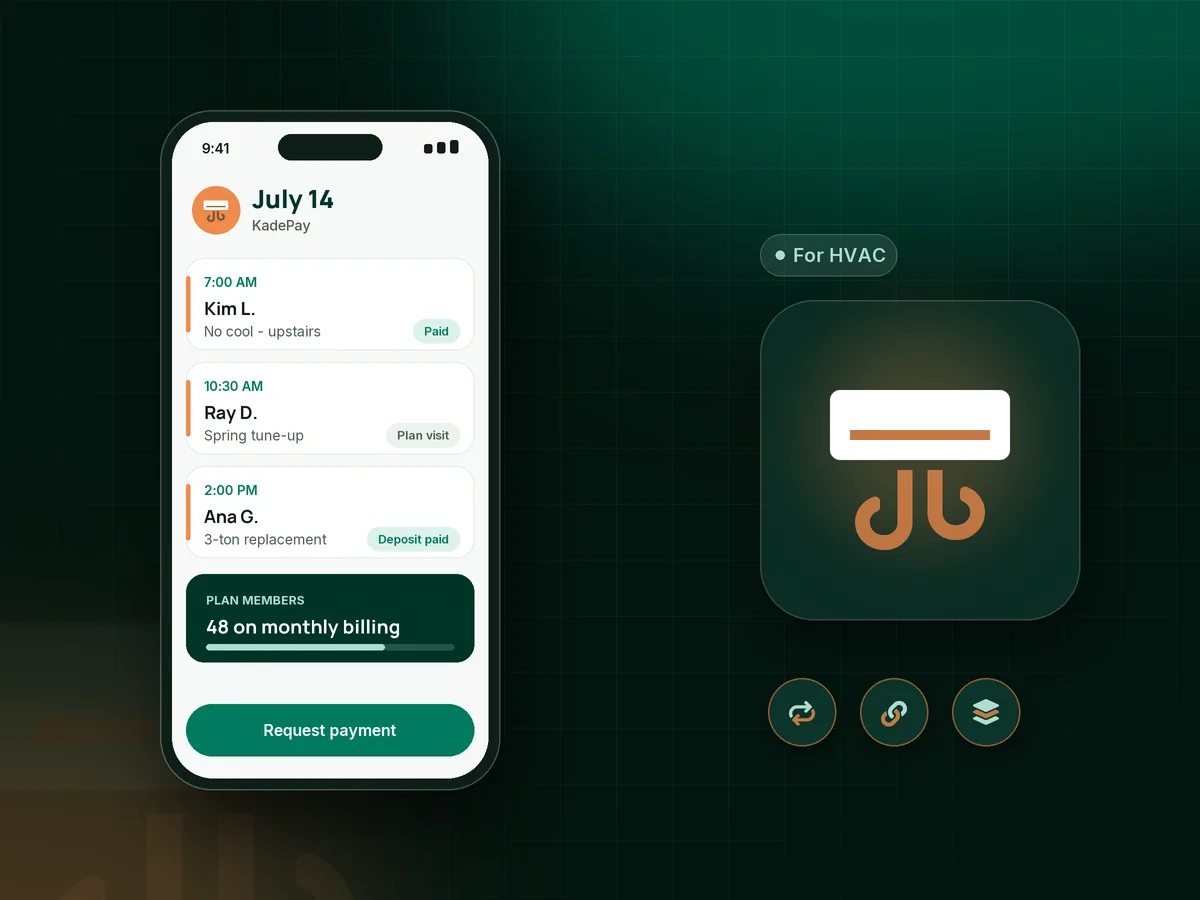
Spring is AC tune-ups, July is no-cool calls until 9 PM, and November brings furnace igniters and cracked heat exchangers. KadePay keeps the money side steady through every swing: maintenance agreements billed on schedule, deposits before you order a condenser, and Tap to Pay on a compatible phone in the mechanical room.

Pay-As-You-Go starts at $0 per month. Usage and payment fees apply.

Illustration of an HVAC technician's day in KadePay HVAC invoicing software with a no-cool call, a tune-up plan and a system deposit

Sound familiar?

Busy season pays the bills. Slow season tests them.

HVAC money comes in waves: a rush of no-cool calls, then a quiet shoulder season when service agreements carry the shop. These are the pressure points techs and owners mention most, and where KadePay fits.

01

Service agreements that lapse because nobody sent the renewal

You sold 60 maintenance plans last spring, half were paid by check, and by fall nobody knows who is current.

With KadePay

Bill each maintenance agreement as a recurring payment on Team or Pro, charged to the method the customer authorized. One list shows who is paid and who needs a call.

Recurring billing
02

Ordering a $6,000 condenser on a handshake

The homeowner says yes on Friday, the distributor wants payment on Monday, and you are carrying the whole system cost over the weekend.

With KadePay

Send an equipment deposit with a fixed-amount link after the customer approves the replacement, then order the system once it shows paid. Subtract it as a line on the final bill.

Payment links and QR codes
03

'I need to talk to my spouse' on a $12,000 replacement

The old furnace is done, it is 30 degrees out, and the family cannot write a five-figure check today.

With KadePay

Offer agreed installments with a payment plan, or let the customer apply for Affirm at checkout where eligible, with approval and terms set by Affirm. ACH bank transfer works for customers paying in full.

Payment plans
04

Night calls where you leave without getting paid

You replaced the igniter at 11 PM, the customer was grateful, and the bill you promised to send tomorrow is still in your head on Thursday.

With KadePay

Collect before you leave with Tap to Pay on a compatible phone, or text the bill from the driveway with a photo of the old part attached.

Tap to Pay and card readers
05

Equipment details lost between visits

Filter size, model and serial, refrigerant type and the attic access are scribbled on a sticker that faded two summers ago.

With KadePay

Store model numbers, filter sizes and access notes in private notes on the customer profile, and keep nameplate photos in a Gallery folder for the next tech.

Customer profiles and notes

How it fits your week

How an HVAC call turns into a paid job

  1. The request

    A homeowner requests a tune-up or a repair time from your booking link. You confirm it, and automatic appointment reminders help them remember to clear the attic access.

  2. Diagnose and document

    Photograph the burned contactor or the rusted drain pan, and add your readings to the customer profile before you talk price.

  3. Get the yes in writing

    For bigger repairs, the customer signs a work authorization form on their phone. Replacements get a deposit link before you order equipment.

  4. Paid on the spot

    Tap the card on a compatible phone, show your QR, or text the bill with photos and reminders. Big systems can move to a payment plan.

  5. Sign them up for the plan

    Offer a maintenance agreement billed monthly or yearly on Team or Pro, so the next tune-up is already paid for when the season turns.

Every way your customers pay

  • Visa
  • Mastercard
  • American Express
  • Discover
  • Apple Pay
  • Google Pay
  • Tap to Pay
  • ACH bank transfer
  • Affirm, where eligible
  • Venmo
  • Zelle
  • QR codes
  • Text and email links

Availability depends on your account setup and eligibility. You confirm Venmo and Zelle payments after checking they arrived.

KadePay for HVAC

Choosing HVAC invoicing software: the best HVAC app for small business

A two-van shop does not need every module a 40-tech company runs. If what you really need is to bill the repair, collect for the tune-up and keep agreements current, look for HVAC invoicing software that handles those three well. KadePay focuses on that: bills by text or email, card and bank payments, and recurring billing for plan members.

An HVAC service agreement is the steadiest money in the trade, but only if it is billed on time. On Team or Pro you can charge a monthly comfort plan, or a yearly furnace tune-up and AC check, to the method the customer authorized, and every charge shows up in one list of transactions. A signed agreement form spells out the visits included and how the customer cancels.

Replacement season is where HVAC financing for customers matters. A $9,500 heat pump is easier to approve when it can be split into agreed installments from a saved method, or when the customer can apply for Affirm at checkout where eligible. For the AC repair invoice on a hot afternoon, take credit cards in the field with Tap to Pay on a compatible phone and keep moving to the next call.

CLEAR ANSWERS

HVAC technicians: your questions, answered.

What is the best HVAC invoicing software for a small HVAC company?

For a small shop, the best fit bills repairs on site and keeps maintenance agreements paid. KadePay sends bills with photos, takes Tap to Pay on a compatible phone, collects equipment deposits by link and runs recurring plan billing on Team or Pro.

How do I bill HVAC maintenance agreements every month?

On Team or Pro, set up the agreement as a recurring payment, ask the customer to authorize a saved payment method, and KadePay charges it on the schedule you set. Pair it with a signed agreement form that lists the visits included.

Can I offer HVAC financing for customers on a new system?

Yes, in two ways. You can agree on a payment plan with a set number of installments collected from an eligible saved method, or customers can apply for Affirm pay-over-time at checkout where eligible. Affirm makes the approval decision and sets the terms.

Should I take a deposit before ordering HVAC equipment?

Most shops do for full systems. Send a fixed-amount deposit link after the customer signs the work authorization, order the condenser or furnace once the deposit shows as paid, and subtract it from the final bill.

Can my techs take payments with their own phones?

On Team or Pro you can add team members with permissions, and they can create bills and collect payments in the KadePay app. Tap to Pay needs a compatible phone and completed payment setup; texted bills and your QR work from any phone.

What does KadePay cost for an HVAC business?

An HVAC shop can begin on Pay-As-You-Go at $0 per month, with payment and usage fees per transaction. Recurring billing for maintenance agreements and team members come with Team at $10 per month or Pro at $35 per month. Compare them on the pricing page.

YOUR WORK COMES FIRST

Make room for more customers.

Get started for free