Skip to content
KadePayGet started

KADEPAY FOR NONPROFITS & COMMUNITY GROUPS

A donation app for small nonprofits that run on volunteers.

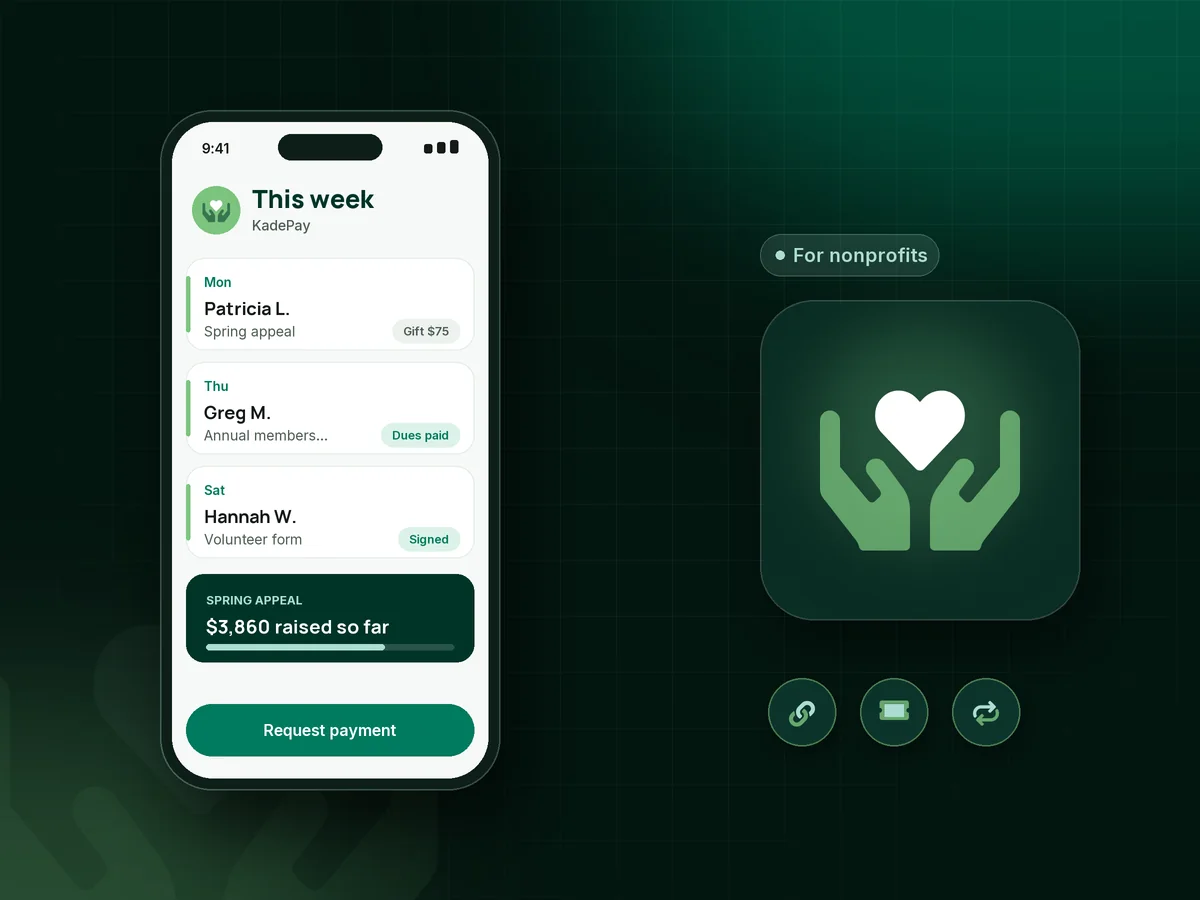
Your board is all volunteers, your fundraiser is in a school gym, and your budget does not stretch to five different tools. KadePay gives you donation links and QR codes, event tickets with QR check-in, member dues and volunteer forms, with every gift in one place.

Pay-As-You-Go starts at $0 per month. Usage and payment fees apply.

Illustration of a donation app for small nonprofits showing a spring appeal gift, event tickets checked in by QR and a signed volunteer form

Sound familiar?

Every dollar matters. So does every volunteer hour.

Small organizations raise money in a dozen small ways: an appeal letter, a gala, a 5K, a bake sale and member dues. These are the spots where money and volunteer time slip away, and how KadePay helps you keep them.

01

Paying for separate tools for giving, tickets and forms

One service for the donate button, another for gala tickets, a form builder for volunteers, and a spreadsheet that ties none of them together.

With KadePay

Run donation links, event tickets, recurring dues and signed forms from one KadePay account, and each supporter's gifts, payments and forms stay together on their profile.

Customer profiles and notes
02

Event-day check-in with a printed list and a highlighter

The gala line is out the door while two volunteers search a printed list for names that were spelled three different ways.

With KadePay

Sell nonprofit event tickets from a link, and each ticket carries a QR code your volunteers scan at the door. Seats are not assigned, so keep your table plan as you like it.

Payment links and QR codes
03

Supporters at the booth who want to give but carry no cash

At the farmers market booth, people love the cause and reach for a wallet they left at home. A clipboard pledge rarely turns into a gift.

With KadePay

Put a fundraiser QR code on the banner so supporters give from their phone, or take Tap to Pay on a compatible phone for gifts and bake sale purchases.

Tap to Pay and card readers
04

Membership dues that lapse because nobody sent a reminder

Forty members paid last spring. This year the secretary moved away, nobody sent renewals, and half of them think they already paid.

With KadePay

Bill nonprofit membership dues as recurring bills on the Team or Pro plan, or send a dues bill by text or email with reminders. Each member's payments stay on their profile.

Recurring billing
05

Volunteer waivers and sign-ups on paper

The river cleanup needs a signed waiver from every volunteer, and last year three of them were filled out on the back of a flyer.

With KadePay

Send a volunteer registration form with your waiver and emergency contact questions. Volunteers sign on their own phone after signing in, and responses stay with their profile.

Forms and signatures

How it fits your week

From appeal to event night to the board report

  1. The appeal goes out

    Your newsletter, flyer and social posts all share one Flex Link that points to the donation link, upcoming event tickets and the volunteer form.

  2. Supporters give

    They give any amount by card, Apple Pay, Google Pay or bank transfer, and the receipt shows the thank-you and acknowledgment wording your organization wrote.

  3. Event night

    Volunteers scan tickets at the door, and the dessert table takes Tap to Pay on a compatible phone or a printed QR for the agreed amount.

  4. Members renew

    Annual dues go out as bills with reminders, or as recurring bills on Team or Pro, and lapsed members get one clear link to catch up.

  5. Board meeting ready

    The treasurer downloads every gift, ticket and dues payment for the bookkeeper, and refunds for a canceled event come from the same place.

Every way your supporters pay

  • Visa
  • Mastercard
  • American Express
  • Discover
  • Apple Pay
  • Google Pay
  • Tap to Pay
  • ACH bank transfer
  • Affirm, where eligible
  • Venmo
  • Zelle
  • QR codes
  • Text and email links

Availability depends on your account setup and eligibility. You confirm Venmo and Zelle payments after checking they arrived.

KadePay for nonprofits

Picking the best donation app for small nonprofits on a tight budget

Nonprofit fundraising software is often built for development teams with a full-time staff. A small nonprofit with a volunteer board usually needs fewer things done well: a way to accept donations online, sell tickets for the yearly event, collect dues and get waivers signed. Most of that work is done by people who also have day jobs.

KadePay covers those with donation links, a fundraiser QR code for flyers and booths, nonprofit event tickets with QR check-in and signed forms. Supporters give by card, Apple Pay, Google Pay or ACH bank transfer, and where permitted you can pass eligible credit-card fees to the supporter.

Recurring donations and membership dues work on the Team and Pro plans as recurring bills, which steadies the budget between events, especially in the quiet months after the gala. Every gift, ticket and dues payment stays on the supporter's profile with private notes your team can see and supporters cannot.

KadePay does not determine your organization's legal or tax status and does not write acknowledgment letters for you. You supply your own wording for the donation receipt, and your treasurer downloads the transactions for the books and the board.

CLEAR ANSWERS

Nonprofits & community groups: your questions, answered.

What is the best donation app for small nonprofits?

One that covers giving, events and dues without a separate tool for each. KadePay offers donation links and QR codes, event tickets with QR check-in, recurring dues on Team or Pro, volunteer forms and Tap to Pay on a compatible phone, all in one account.

How can a small nonprofit accept donations online without a website?

Create a donation link in KadePay and share it by text, email and social posts, or print its QR code on flyers and banners. Supporters give any amount from their phone. A Flex Link can also point to your events and forms.

Can KadePay send donation receipts for tax purposes?

KadePay sends a payment receipt, and you can add your organization's own acknowledgment wording to it. It does not decide whether a gift qualifies for any tax treatment or verify your status, so check your wording with your accountant.

How do we sell tickets for a nonprofit gala or 5K?

Create a ticket link with your price and share it, and each buyer receives a ticket with a QR code. Volunteers scan it at check-in. Tickets do not assign seats or cap sales, so watch your own headcount.

Can volunteers sign waivers on their phones?

Yes. Build a volunteer registration form with your waiver, emergency contact and photo-release questions. Volunteers complete and sign it on their own phone after signing in, and you find it on their profile next time.

How much does KadePay cost for a nonprofit?

For a volunteer-run group, Pay-As-You-Go starts at $0 per month; payment and usage fees apply. Recurring donations, dues and board member logins need Team or Pro. See the pricing page for plan details.

YOUR WORK COMES FIRST

Make room for more supporters.

Get started for free