Skip to content
KadePayGet started

KADEPAY FOR COURIERS & LOCAL DELIVERY

A courier invoicing app for drivers who would rather be driving.

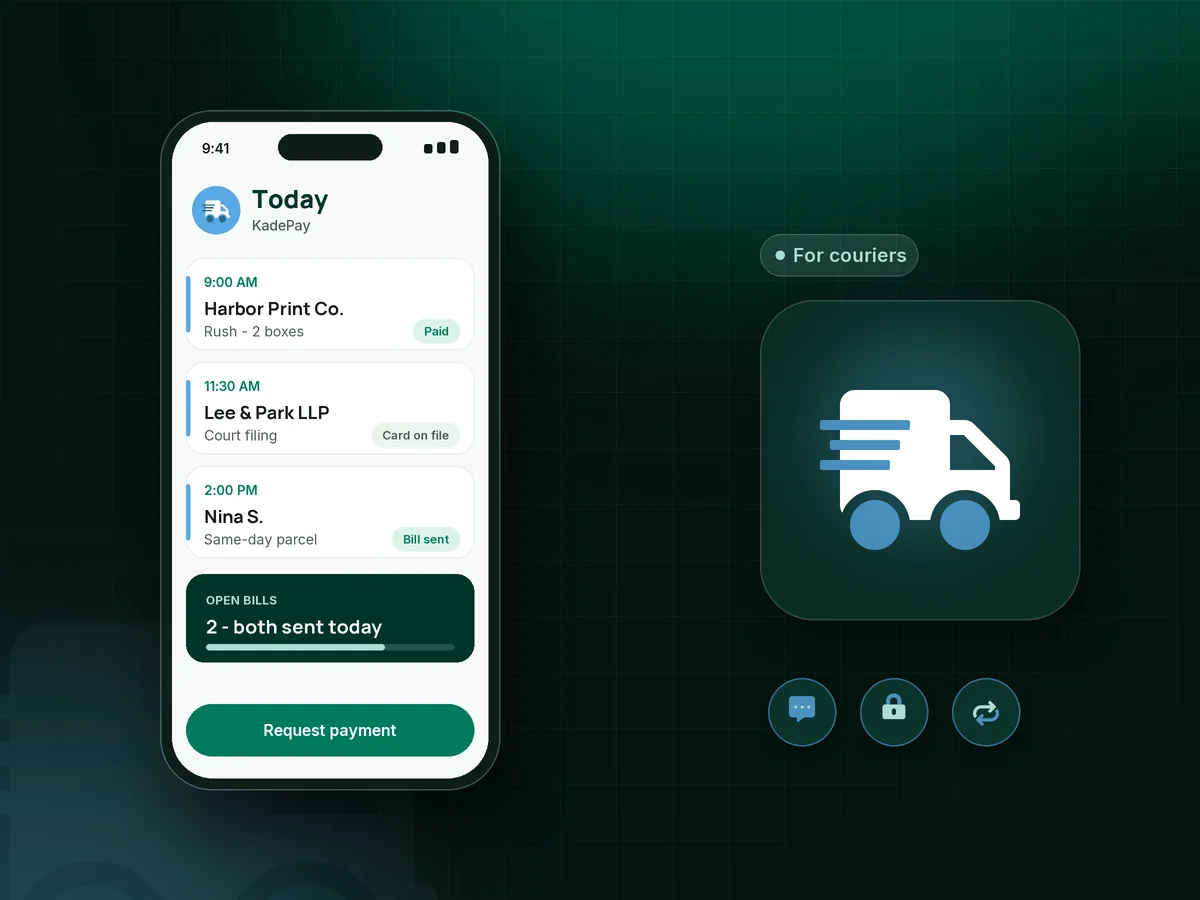
You picked up at 9, dropped at 9:40 and the invoice waits until Sunday night. KadePay lets you text the bill with the delivery photo attached, keep regular customers' cards on file, and take payment at the door with Tap to Pay on a compatible phone.

Pay-As-You-Go starts at $0 per month. Usage and payment fees apply.

Illustration of a courier invoicing app with a texted bill and delivery photo, a weekly standing run and a payment collected at the door

Sound familiar?

You run the deliveries. The invoices should not run you.

Local courier work pays in small amounts from many customers, some of them businesses with slow accounts payable. These are the billing headaches independent couriers describe, and how KadePay takes them off the passenger seat.

01

Invoicing at night from a pile of delivery slips

Twenty runs a day means twenty slips in the cup holder, and every Sunday goes to typing them into a spreadsheet.

With KadePay

Create the bill from your phone right after the drop, attach the proof of delivery photo, and text or email it to the customer. They pay from the link by card, wallet or bank transfer.

Ways to get paid
02

Business customers who pay net 30, or net 60, or never

The print shop loves your same-day delivery and pays two months late. Their accounts person wants an invoice emailed, then emailed again.

With KadePay

Send each bill by email with reminders, so nobody has to remember the follow-up. Or ask the office to authorize a card on file and charge it as runs are completed.

Card on file
03

One-off customers who want to pay at the door

A neighbor needs a package taken across town today, has no account with you and only carries a phone.

With KadePay

Take Tap to Pay on a compatible phone at pickup, or show a printed QR so they enter the agreed price and pay. To collect payment on delivery instead, take it at the drop the same way.

Tap to Pay and card readers
04

Rush fees and wait time nobody agreed to in writing

You waited forty minutes at the loading dock and added a wait charge. The customer says nobody told them about it.

With KadePay

Have new accounts sign your service terms, including the rush delivery fee, wait time and after-hours rates, on their phone. The signed form stays on their profile for the day someone asks.

Forms and signatures
05

Standing weekly runs billed by hand every week

The bakery has you take orders to three cafes every Friday. Same runs, same price, and you still build the invoice from scratch.

With KadePay

On the Team or Pro plan, set up a recurring bill for the standing run at the agreed weekly price. It goes out on schedule and the bakery pays without a new invoice each week.

Recurring billing

How it fits your week

A delivery day, billed as you go

  1. The job comes in

    A regular customer texts a rush pickup, or a new one fills in your service request form from your Flex Link. You agree the price before you go.

  2. Pickup and drop

    At the drop, snap the proof photo into the customer's Gallery folder. One-off customers pay on the spot with Tap to Pay on a compatible phone.

  3. Billed before the next stop

    Business customers get a bill by text or email with the photo attached and the job number in the description. Card-on-file accounts are charged with a receipt.

  4. Standing runs bill themselves

    Weekly and monthly runs go out as recurring bills on Team or Pro, so Friday's bakery run does not need a new invoice.

  5. Month end without the shoebox

    Download every transaction for your bookkeeper, refund a damaged-item charge from the same screen, and see which bills are still open.

Every way your customers pay

  • Visa
  • Mastercard
  • American Express
  • Discover
  • Apple Pay
  • Google Pay
  • Tap to Pay
  • ACH bank transfer
  • Affirm, where eligible
  • Venmo
  • Zelle
  • QR codes
  • Text and email links

Availability depends on your account setup and eligibility. You confirm Venmo and Zelle payments after checking they arrived.

KadePay for couriers

Looking for the best courier invoicing app for a small delivery business?

Delivery management platforms are built for assigning drivers and tracking vans. Many independent courier operators already have that covered with a phone and a group text. What they lack is a courier payment app that turns each finished run into a bill, collects it, and keeps the record tidy.

Here is how to invoice delivery customers without the Sunday catch-up: create the bill on your phone at the drop, attach the photo, and send it by text or email with reminders. Regular accounts can authorize a card on file so each run is charged with a receipt, and net 30 customers still get a clean bill with a link.

For a local delivery business, a lot of income is small and same-day. Tap to Pay on a compatible phone, a QR on the van and ACH bank transfer for larger accounts cover most of it, and Venmo or Zelle payments can be recorded with no KadePay fee.

KadePay does not plan stops, assign drivers or show a live map to the customer. It handles the money and the paperwork: bills, card authorizations, signed terms and a transaction download your bookkeeper can use.

CLEAR ANSWERS

Couriers & local delivery: your questions, answered.

What is the best courier invoicing app for an independent driver?

One you can use at the drop. KadePay creates bills on your phone with delivery photos attached, sends them by text or email with reminders, keeps business cards on file with authorization and takes Tap to Pay on a compatible phone.

How do I invoice delivery customers who pay net 30?

Send the bill by email right after the run with reminders turned on, and include the job number or PO. If they would rather not handle invoices either, ask them to authorize a card or bank account on file.

Can I collect payment on delivery for a local courier run?

Yes. Take Tap to Pay on a compatible phone at the door, or show a printed QR where the customer enters the agreed amount and pays on their own phone. The payment shows in your Transactions with the rest of the day's runs.

How should a courier charge a rush delivery fee?

Put your rush, wait time and after-hours rates in service terms the customer signs before the first job. Then add the fee to the bill with a short note, so the charge matches what they agreed to.

Does KadePay plan delivery stops or track drivers?

No. It does not plan stops, assign jobs or show driver locations. KadePay is the billing and payment side of a courier business: bills with photos, cards on file, recurring runs, signed terms and payments at the door.

How much does KadePay cost for a courier?

For a one-van courier, Pay-As-You-Go starts at $0 per month; payment and usage fees apply. Recurring bills for standing runs and team members need Team or Pro. Details are on the pricing page.

YOUR WORK COMES FIRST

Make room for more customers.

Get started for free