Skip to content
KadePayGet started

KADEPAY FOR APPLIANCE REPAIR

An appliance repair invoice app for diagnosis, parts and the fix.

Most appliance jobs take two trips: one to diagnose the dead dryer or the warm fridge, one to install the part that had to be ordered. KadePay lets you collect for the first visit on the spot, take a deposit on the part by link, and bill the repair with model and serial photos attached.

Pay-As-You-Go starts at $0 per month. Usage and payment fees apply.

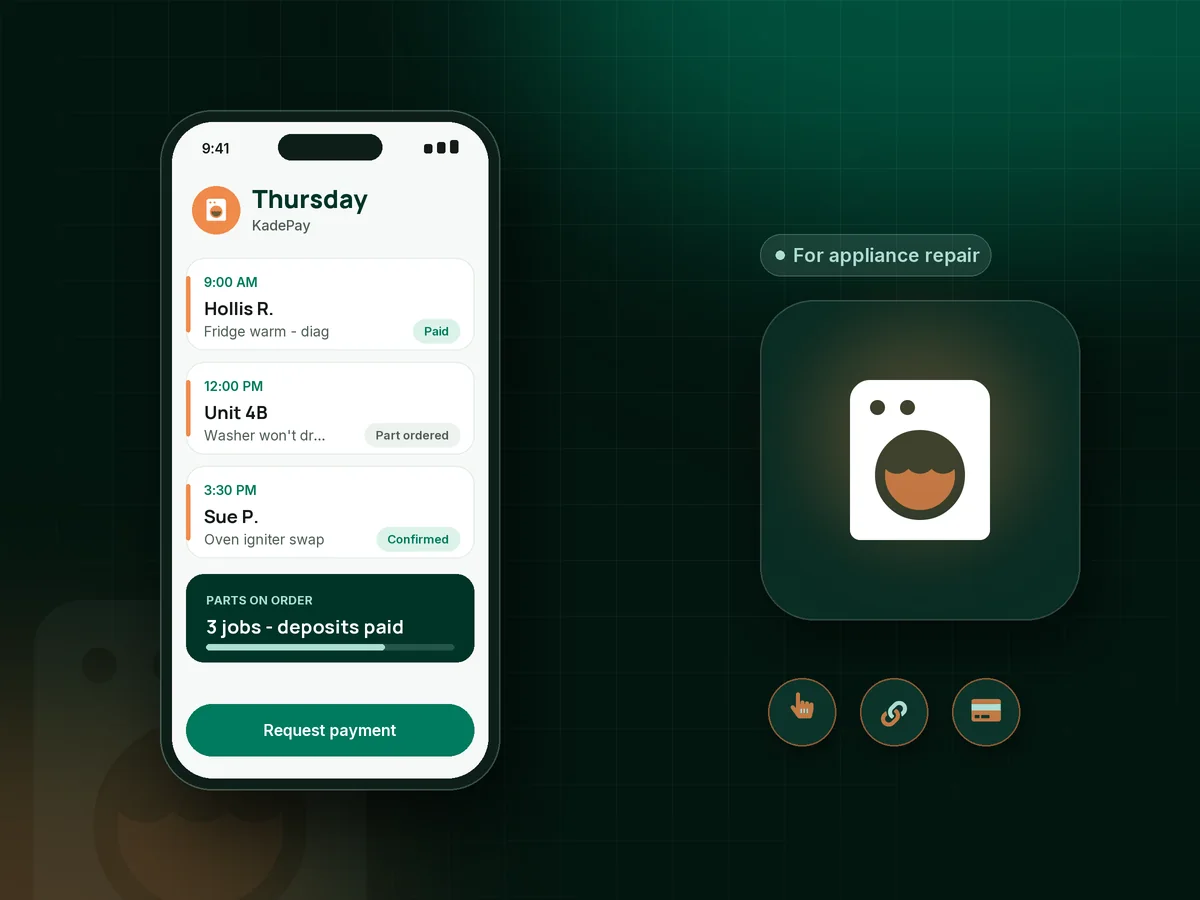
Illustration of an appliance tech's day in the KadePay appliance repair invoice app with a fridge diagnosis, a part deposit and a washer job

Sound familiar?

Two trips per repair, and only one of them gets paid

Appliance repair has a rhythm of its own: diagnose, order the part, come back, fix it. These are the money problems appliance techs mention most, and how KadePay helps you stop losing the first trip.

01

Diagnosis visits that end with 'we'll just buy a new one'

You spent forty minutes on a 12-year-old washer, the customer decides to replace it, and now they balk at the $95 diagnostic fee.

With KadePay

Explain the diagnosis charge in a short form the customer signs before you open the machine, then collect it on the spot with Tap to Pay on a compatible phone.

Forms and signatures
02

Ordering a $260 control board for a customer who disappears

The board is non-returnable once opened, the part arrives, and the homeowner stops answering because they found a used fridge online.

With KadePay

Send a deposit for the part with a fixed-amount link before you order. When it shows paid, place the order, and credit the amount on the repair bill when you return.

Payment links and QR codes
03

Model and serial numbers copied wrong on a sticky note

One wrong digit in the serial number and you order the wrong pump, eat the shipping and lose another day of the customer's patience.

With KadePay

Photograph the model and serial tag and keep it in the customer's Gallery folder, with the part numbers and error codes in private notes.

Customer profiles and notes
04

Landlords and property managers who pay slowly

The tenant let you in, the property manager approved the repair by email, and the payment shows up in 45 days if it shows up at all.

With KadePay

Bill the owner directly with the tenant's unit noted, attach photos of the failed part and the work order, and turn on reminders. Owners can pay by card or ACH bank transfer from the link.

Ways to get paid
05

Customers who want to pay with Venmo or Zelle

Some customers want to send Venmo, some want Zelle, and the rest want to pay by card, so payments end up scattered across three apps.

With KadePay

Let customers send Venmo or Zelle from their own app and record it on the bill, with no KadePay fee on those. Cards, Apple Pay and Google Pay work from the same bill link.

Venmo, Zelle and cards

How it fits your week

An appliance repair, visit one to visit two

  1. The request

    A customer with a leaking dishwasher requests a time from your booking link. You confirm it, and automatic appointment reminders help make sure someone is home.

  2. Diagnose and collect

    Photograph the model tag and the fault, explain the repair, and collect for the visit before you leave with Tap to Pay on a compatible phone.

  3. Deposit on the part

    If a part has to be ordered, text a fixed-amount deposit link. Order once it shows paid, and note the part number on their profile.

  4. Return and repair

    Install the part, test the cycle, and text the repair bill with photos attached and the deposit subtracted as a line.

  5. Next time is easier

    Model, serial, part history and the quirks of their kitchen stay on the profile for the next call or the next tech.

Every way your customers pay

  • Visa
  • Mastercard
  • American Express
  • Discover
  • Apple Pay
  • Google Pay
  • Tap to Pay
  • ACH bank transfer
  • Affirm, where eligible
  • Venmo
  • Zelle
  • QR codes
  • Text and email links

Availability depends on your account setup and eligibility. You confirm Venmo and Zelle payments after checking they arrived.

KadePay for appliance repair

Best app for appliance repair technicians: an appliance repair invoice app

Appliance repair is a two-visit trade more often than not. The first trip is diagnosis, and the second is the part and the fix. An appliance repair invoice app that only bills at the end leaves the first trip and the ordered part at risk. KadePay lets you collect the diagnostic fee on visit one and a parts deposit before the order.

Refrigerator repair calls are urgent because food is spoiling, and washer and dryer repair calls stack up when a family is out of clean clothes. In both cases the customer is usually home, so Tap to Pay on a compatible phone or a printed QR settles the appliance repair service call before you leave. A texted bill with photos works when someone else is paying.

Landlord appliance repairs need a cleaner paper trail than most. Bill the owner with the unit noted and the failed part photographed, and let them pay by card or ACH from the link. As an appliance repair payment app, KadePay also records Venmo and Zelle, so every job sits in one list for your bookkeeper.

KadePay will not look up parts or manage stock on your van. It handles the paying part of the job and the customer record behind it.

CLEAR ANSWERS

Appliance repair: your questions, answered.

What is the best appliance repair invoice app for a solo technician?

One that handles both visits. KadePay collects for the diagnosis with Tap to Pay on a compatible phone, sends part deposits by link, bills the repair with photos by text or email and records Venmo or Zelle payments.

Should I charge a diagnostic fee for appliance repair?

Many technicians do, and some credit it toward the repair if the customer goes ahead. Put your policy in a short form the customer signs before you start, and collect the charge on site whether or not they proceed.

How do I take a deposit for appliance parts?

Send a fixed-amount deposit link once the customer approves the repair. Order the part after it shows paid, note the part number on their profile, and credit the deposit on the final repair bill when you come back.

Can I bill a landlord for a tenant's appliance repair?

Yes. Create the bill under the owner or property manager, note the unit in the description, attach photos of the failed part and send it by text or email. They can pay by card or ACH bank transfer, and reminders help with slow payers.

Can I offer maintenance plans like yearly coil or vent cleaning?

Yes, on Team or Pro. Set the plan up as a recurring payment the customer authorizes on a saved card, and describe the visits in a form they sign. Each visit is still requested and confirmed separately on your calendar.

What does KadePay cost for an appliance repair business?

Appliance techs can start on Pay-As-You-Go at $0 per month; payment and usage fees apply. Team at $10 per month adds technicians with permissions and recurring billing, and Pro at $35 per month suits busier shops. The pricing page has the full breakdown.

YOUR WORK COMES FIRST

Make room for more customers.

Get started for free