Skip to content
KadePayGet started

KADEPAY FOR IT SUPPORT & COMPUTER REPAIR

IT support billing software for monthly plans and on-site fixes.

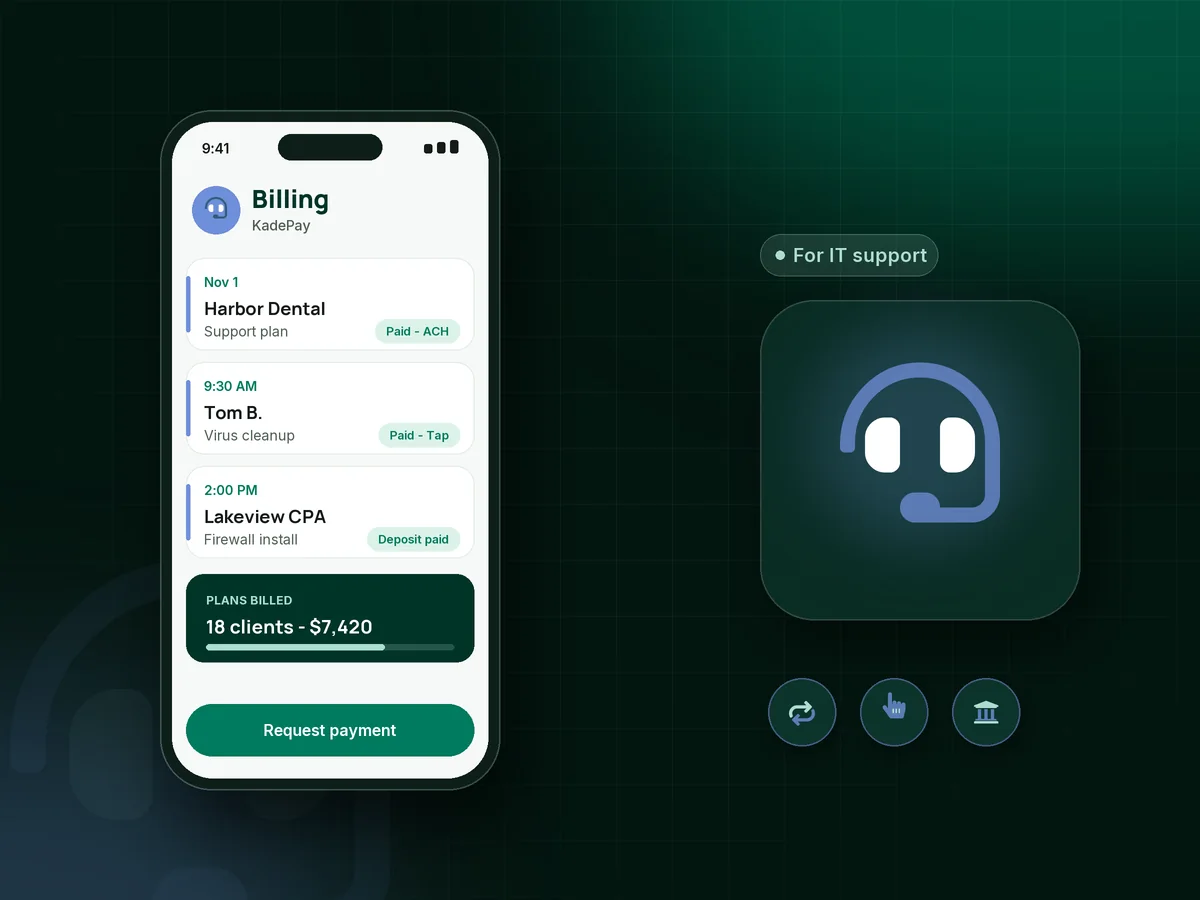
Half your revenue is the monthly support plan, and the other half is the printer that died at 8 AM. KadePay bills support plans on a schedule from an authorized card or bank account, takes payment on-site with Tap to Pay and sends project bills clients can pay by ACH.

Pay-As-You-Go starts at $0 per month. Usage and payment fees apply.

Illustration of IT support billing software in KadePay showing paid monthly support plans, an on-site repair payment and a remote support link

Sound familiar?

You fix the network. The billing shouldn't need fixing too.

Small IT shops juggle flat monthly plans, break-fix calls and hardware projects, often with one person doing the billing at night. These are the payment problems IT owners raise most, and how KadePay handles them.

01

Monthly support plans paid late, or not at all

Clients treat your support agreement like a bill they can sit on, then call in a panic when the server goes down.

With KadePay

Put each monthly IT support plan on a recurring bill on Team or Pro, charged to the card or bank account the client authorized, with a receipt every month.

Recurring billing
02

Break-fix jobs invoiced days after the work

You fixed the email problem at 9 AM, wrote the invoice at 11 PM, and by then the client has forgotten what it was for.

With KadePay

Send break-fix billing from your phone before you pack up, with photos or notes attached, or take payment on the spot with Tap to Pay on a compatible phone.

Tap to Pay and card readers
03

Buying hardware for a project before the client pays

A new firewall and six laptops go on your card, and the client pays sixty days later, if the project goes smoothly.

With KadePay

Collect a deposit for hardware and setup with a fixed-amount link before you order anything, then bill the balance by ACH when the install is finished.

Payment links and QR codes
04

Remote sessions with no easy way to get paid

You spend forty minutes on a remote session for a home user, then have to explain how to mail you a check.

With KadePay

Text a remote support payment link for the agreed amount when the session ends. The home user pays by card, Apple Pay or Google Pay before you hang up.

Payment links and QR codes
05

Large project invoices clients balk at paying by card

A $9,000 network refresh on a card costs you real money, and the office manager would rather pay from the business account anyway.

With KadePay

Offer ACH payments for IT services on bigger bills so clients pay straight from their bank. For the largest upgrades, agree a payment plan with a set number of installments.

Payment plans

How it fits your week

How a small IT shop runs billing with KadePay

  1. Service requests booked

    Clients request an on-site visit or remote session from your booking link. You confirm the time, and each on-site appointment keeps the client's address.

  2. Agreement signed on day one

    Your support agreement, coverage and payment terms go out as a form the client signs, along with a card or bank account authorization.

  3. Plans billed every month

    On Team or Pro, managed IT services billing runs as recurring bills on the date you choose, charged to each client's authorized method.

  4. Break-fix paid on the spot

    Finish the repair, then take payment with Tap to Pay, a QR code or a texted bill with photos of the work attached.

  5. Projects billed in stages

    Take a deposit before ordering hardware, bill the balance by ACH at completion, and download transactions for your bookkeeper each month.

Every way your clients pay

  • Visa
  • Mastercard
  • American Express
  • Discover
  • Apple Pay
  • Google Pay
  • Tap to Pay
  • ACH bank transfer
  • Affirm, where eligible
  • Venmo
  • Zelle
  • QR codes
  • Text and email links

Availability depends on your account setup and eligibility. You confirm Venmo and Zelle payments after checking they arrived.

KadePay for IT support

What the best IT support billing software looks like for a small shop

Small business IT support usually mixes three kinds of income: a monthly plan, break-fix work and projects. The best billing setup gives each its own path, so the plan bills on schedule, the repair is paid before you leave and the project is funded before you order hardware.

Managed IT services billing works when the client signed for it and authorized the payment method up front. ACH payments for IT services keep card costs down on larger plans, and a client who prefers a card can still use one, with eligible card fees passed on where permitted. A signed agreement also settles what the plan covers when a client asks for a free new laptop setup.

For computer repair payments at the counter or on-site, Tap to Pay on a compatible phone or a printed QR code keeps checkout quick. A computer repair deposit covers parts on bigger jobs, and photos attached to the bill show the client what was done. Home users who call after a virus scare can pay a remote session from a texted link before the call even ends.

KadePay is not a ticketing system, remote monitoring tool or parts tracker. It sits beside those tools as the payment, booking request and client records side of the business, and transaction downloads keep your bookkeeper happy.

CLEAR ANSWERS

IT support & computer repair: your questions, answered.

What is the best IT support billing software for a one or two person shop?

Look for recurring billing for support plans, on-site card payments and ACH for projects in one place. KadePay covers those, plus booking requests, signed agreements, client notes and payment plans, without a full ticketing system you may not need.

How do I bill clients for a monthly IT support plan?

On Team or Pro, create a recurring bill for the plan amount and ask the client to authorize a card or bank account. KadePay bills it on your chosen date, and the client can see every bill on your branded business page.

Can I take card payments on-site without a card reader?

Yes. Install the KadePay app on a compatible iPhone or Android phone, finish payment setup, and your phone accepts contactless cards right at the client's desk. You can also show a printed QR code, text a bill, or purchase a card reader for the shop counter.

Should I charge a deposit for computer parts or hardware projects?

For anything you have to buy up front, yes. Send a fixed-amount deposit link before ordering, note it on the client profile, and bill the remainder when the work is finished. Small repairs can simply be paid at pickup or on-site.

Does KadePay include ticketing or remote monitoring?

No. KadePay does not track tickets, monitor devices or manage parts. It handles booking requests, bills, payments, agreements and client notes, so keep your help desk and monitoring tools for the technical side.

What does KadePay cost for a small IT business?

Recurring support plans need Team at $10 per month or Pro at $35 per month, which also add technicians as team members. A shop doing only break-fix work can stay on Pay-As-You-Go at $0 per month, with payment and usage fees. The pricing page has details.

YOUR WORK COMES FIRST

Make room for more clients.

Get started for free