Skip to content
KadePayGet started

KADEPAY FOR AUTO REPAIR SHOPS

The payment app for auto repair shops: paid before the keys go back.

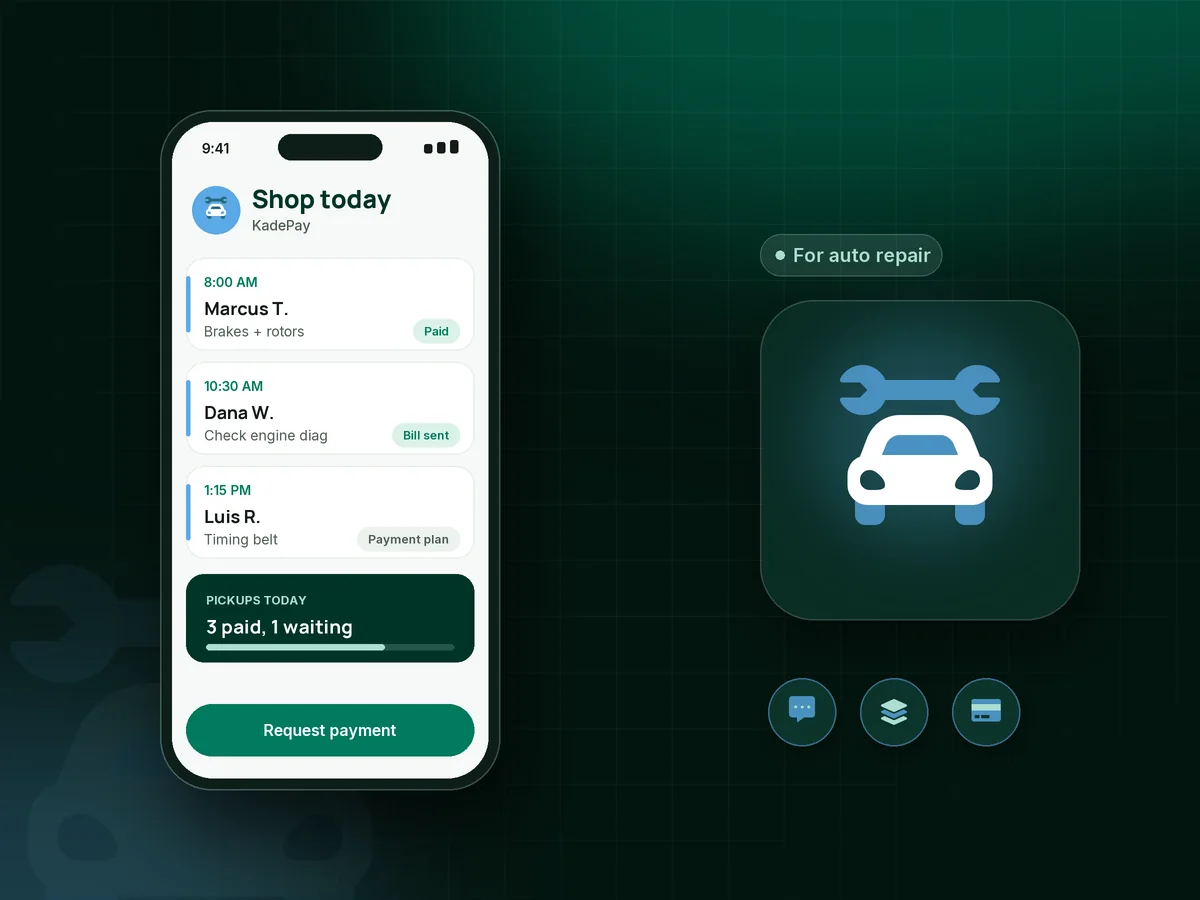
The car is done, the customer is at work, and the ticket is still open. Text the bill with your inspection photos attached, let them pay from their phone, and hand the keys back to someone who has already paid. Bigger repairs can go on a payment plan you agree on, or on Affirm where the customer is eligible.

Pay-As-You-Go starts at $0 per month. Usage and payment fees apply.

Illustration of the payment app for auto repair shops showing a texted bill with inspection photos and a paid brake job

Sound familiar?

You fixed the car. Now you are chasing the money.

Most shops do not lose money in the bay. They lose it at the counter, on the phone and in the parking lot. Here are the moments that slow your cash down, and how KadePay handles each one.

01

Customers who want the keys before they pay

They show up at 5:55, want to grab the car and say they will pay tomorrow. Some of them do.

With KadePay

Text the bill the moment the work is done so the customer pays from their phone before they arrive. At the counter, take Tap to Pay on a compatible phone or a printed QR.

Payment links and QR codes
02

Approvals by phone tag while the car sits on the lift

You found a leaking water pump during the oil change. Now you have left two voicemails and the bay is tied up.

With KadePay

Put the photos in a shared Gallery folder on the customer's profile and send your repair authorization form. They see the leak, sign on their phone, and you keep the signature with their record.

Customer profiles and notes
03

A $2,400 repair the customer cannot cover today

The transmission number lands and the customer goes quiet. Without a way to spread it out, they tow it home or sell the car.

With KadePay

Agree on a payment plan with a set number of installments collected from a saved card, or let the customer choose Affirm pay-over-time at checkout where eligible and approved.

Payment plans
04

Card numbers read over the phone and scribbled on the RO

A fleet manager calls in a card for three vans, your advisor writes it on a repair order, and that paper sits on the counter all day.

With KadePay

Ask regular customers to authorize a card on file once. Charge it when the job closes and they get a receipt, or use New Charge to take card payments over the phone.

Card on file
05

Night-drop envelopes with half the details missing

The key comes through the slot with a note that says 'makes a noise.' No phone number, no mileage, no OK to diagnose.

With KadePay

Put a QR code on the drop box that opens your drop-off form. The customer describes the concern, adds the vehicle details, signs the diagnostic authorization and it lands on their profile.

Forms and signatures

How it fits your week

From drop-off to keys back, one ticket at a time

  1. The car comes in

    The customer requests a time from your booking link or drops the key at night. Either way, a signed drop-off form with the concern and vehicle details is waiting on their profile.

  2. The tech finds more

    Photos of the cracked belt go into a shared Gallery folder, and the customer signs your authorization form for the added work from wherever they are.

  3. The bill goes out by text

    When the work order closes, create a bill for the final total, attach the inspection sheet and send it by text, with a reminder if needed.

  4. Paid before pickup

    The customer pays by card, Apple Pay, Google Pay, bank transfer or Affirm where eligible. By the time they reach the counter, the bill already shows paid.

  5. Next service on the calendar

    Send your booking link for the next oil change. Private notes on the profile remember the tire size, the preferred way to reach them and that they like to wait.

Every way your customers pay

  • Visa
  • Mastercard
  • American Express
  • Discover
  • Apple Pay
  • Google Pay
  • Tap to Pay
  • ACH bank transfer
  • Affirm, where eligible
  • Venmo
  • Zelle
  • QR codes
  • Text and email links

Availability depends on your account setup and eligibility. You confirm Venmo and Zelle payments after checking they arrived.

KadePay for auto repair

What to look for in a payment app for auto repair shops

Many independent garages already run auto repair shop software for repair orders, parts and labor times. KadePay does not replace that. It sits on the money side: the bill you text when the car is done, the card on file for your regular customers, and the payment that clears before anyone asks for the keys.

Text to pay for auto repair works because customers rarely sit in the waiting room anymore. They drop the car, go to work and want a link, not a phone call. With KadePay the link carries your inspection photos, so the customer sees the worn pads or the cracked hose before paying, and pay before pickup becomes the normal routine at your shop.

Big tickets need a plan. Auto repair financing through Affirm is available at checkout where the customer is eligible and approved, and KadePay payment plans let you agree a set number of installments yourself. Either way, the customer has a clear plan before the car leaves the lot.

For mechanic shop credit card processing at the counter, use Tap to Pay on a compatible phone, a card reader or a printed QR, and key in phone payments with New Charge. Customers can also pay by ACH bank transfer, Apple Pay or Google Pay, and your bookkeeper can download every transaction.

CLEAR ANSWERS

Auto repair shops: your questions, answered.

What is the best payment app for auto repair shops?

Look for one that gets you paid before the keys go back without changing how your techs work. KadePay texts bills with photos attached, takes Tap to Pay on a compatible phone, keeps cards on file with the customer's authorization and offers payment plans and Affirm where eligible.

Does KadePay replace my auto repair shop software?

No. KadePay does not build repair orders, look up labor times, track parts or decode VINs. Keep your shop system for that and use KadePay as your auto repair invoice app and payment side: send the bill, collect the payment, store signed authorizations and keep customer notes.

How do I get customers to pay before they pick up the car?

Text the bill as soon as the work is finished, with photos of what you replaced, so the customer can pay from the link before they leave work. For anyone who still arrives unpaid, take Tap to Pay on a compatible phone or let them scan your counter QR.

Can I offer auto repair financing or payment plans?

Yes, two ways. Affirm pay-over-time appears at checkout for eligible customers, and approval is up to Affirm. Or agree a payment plan yourself: a set number of installments collected from an eligible saved card or bank account.

Can customers sign a repair authorization form on their phone?

Yes. Build the form with your own wording: the concern, the diagnostic fee and the dollar amount you may not exceed without calling. The customer signs on their phone after signing in, and the form stays on their profile. Check your state's rules for the wording you need.

How much does KadePay cost for an independent garage?

For a one- or two-bay garage, Pay-As-You-Go starts at $0 per month; payment and usage fees apply. Team adds team members and recurring billing, and Pro suits busier shops. The pricing page lists current plan details.

YOUR WORK COMES FIRST

Make room for more customers.

Get started for free