Skip to content
KadePayGet started

KADEPAY FOR CARPET & UPHOLSTERY CLEANERS

Carpet cleaning business software that gets you paid at the door.

The rooms are agreed, the stairs are done and the sectional came out better than expected. KadePay puts every room and add-on on one clear bill with photos, takes the card at the door and keeps notes on where to park the truck for next time.

Pay-As-You-Go starts at $0 per month. Usage and payment fees apply.

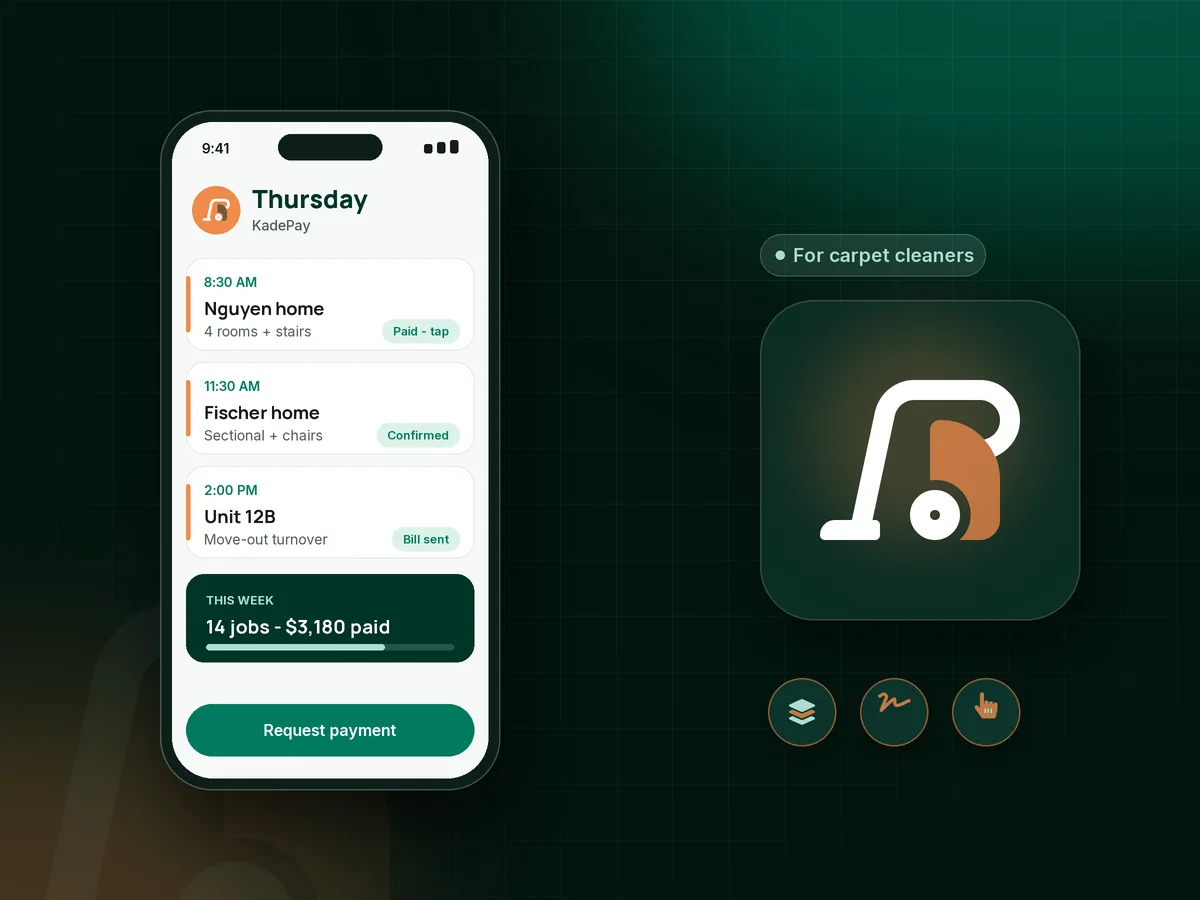
Illustration of carpet cleaning business software with a cleaner's Thursday of room jobs, an upholstery request and a paid rental turnover

Sound familiar?

Fresh carpet, and a price argument at the door.

Carpet cleaning money problems usually start with a surprise: an add-on nobody expected, a stain that will not come out or a customer who forgot the appointment. Here is how KadePay keeps those surprises out of your day.

01

A total that feels higher than the phone price

The customer heard $39 a room on the phone, then sees stairs, a hallway, pet treatment and protector on the final number.

With KadePay

Agree the rooms and add-ons before you start, then send one bill that lists them with before-and-after photos attached. The customer sees what each line covers before paying.

Payment links and QR codes
02

Stains the customer expects to disappear

Bleach spots, old red wine and pet urine in the pad do not lift, and the customer says the job is not finished.

With KadePay

Walk the rooms first and have the customer sign a pre-existing stain waiver on their phone noting permanent spots and wear. The signed form stays on their profile with your photos.

Forms and signatures
03

No one home when the truck pulls up

You hauled the truck mount across the county, rolled out the hose and nobody answered the door.

With KadePay

Take a carpet cleaning deposit with a fixed-amount link when you confirm the booking, and automatic appointment reminders go out before the visit.

Appointment booking
04

Rental turnovers paid weeks after the tenant left

A property manager sends six move-out cleans a month and pays whenever their owner statement clears.

With KadePay

Ask the property manager to authorize a card or bank account, then charge each turnover when it is done and send the bill with photos to their office.

Card on file
05

Area rugs taken back to the shop with no payment yet

You carry a wool rug out to the van, it spends a week drying in the shop, and the payment is still an open question.

With KadePay

Collect a deposit when you pick up the rug, then text a bill for the balance with a photo of the clean rug before you deliver it.

Payment links and QR codes

How it fits your week

How a carpet cleaning day runs with KadePay

  1. Customers request a time

    They choose rooms, upholstery or rugs from your booking link and request a slot. You confirm it, with enough time blocked for the stairs and the sectional.

  2. Walkthrough before the wand

    Walk the rooms, take before photos and have the customer sign your stain and furniture-moving form on their phone.

  3. Notes for the next visit

    Private notes keep where to park the truck, how far the hose reaches, the dog that needs to stay out and which rug is wool.

  4. Paid at the door

    Take a card with Tap to Pay on a compatible phone, charge an authorized card, or text the bill with after photos to customers who left for work.

  5. Repeat customers come back

    Send last year's customers your booking link in spring, and give property managers an authorized card on file for every turnover.

Every way your customers pay

  • Visa
  • Mastercard
  • American Express
  • Discover
  • Apple Pay
  • Google Pay
  • Tap to Pay
  • ACH bank transfer
  • Affirm, where eligible
  • Venmo
  • Zelle
  • QR codes
  • Text and email links

Availability depends on your account setup and eligibility. You confirm Venmo and Zelle payments after checking they arrived.

KadePay for carpet cleaners

How to pick carpet cleaning business software that fits a one-truck shop

Most carpet cleaning business software is sold as a full field service suite. A one-truck operator usually needs three things done well: a carpet cleaning booking app that captures the right job size, a clear carpet cleaning invoice, and a fast way to get paid at the door.

Price surprises cause most disputes in this trade. When the bill lists each room, the stairs and any carpet protector add-on, with photos attached, the customer can see what they paid for. A signed pre-existing stain waiver covers the spots that were never going to come out.

Upholstery cleaning payments usually happen at the door, right after the sofa dries enough to touch. Area rug cleaning payment runs on a different clock: collect a deposit when the rug leaves the house, then send the balance with a photo before you deliver it.

Property manager carpet cleaning work is steady but slow to pay. An authorized card or bank account on file turns each turnover into a charge with a receipt. If you want to take card payments as a carpet cleaner without a reader in the van, Tap to Pay on a compatible phone works once payment setup is complete.

CLEAR ANSWERS

Carpet & upholstery cleaning: your questions, answered.

What is the best carpet cleaning business software for an owner-operator?

Look for booking requests with real durations, bills that list rooms and add-ons with photos, signed stain forms and on-site payment. KadePay covers those, plus card on file for property managers and recorded Venmo or Zelle with no KadePay fee.

How do I avoid price disputes on carpet cleaning jobs?

Confirm rooms and add-ons before you start, then send one bill that lists each item with before-and-after photos attached. A signed walkthrough form that notes permanent stains and wear heads off most arguments about results.

Should carpet cleaners take a deposit?

Many take a small deposit on first-time customers, large homes and rug pickups. A fixed-amount payment link collects it when you confirm the appointment, and you bill the balance after the job.

How can I take card payments at the customer's door?

Use Tap to Pay on a compatible iPhone or Android phone with the KadePay app once your payment setup is complete. Customers can also scan your printed QR or pay a texted bill by card, bank transfer or phone wallet.

Can property managers keep a card on file for turnovers?

Yes. The property manager authorizes a card or bank account for current and future bills, is notified of each charge and can revoke the authorization. You charge each move-out clean and send the bill with photos.

How much does KadePay cost for a carpet cleaning business?

For one van and one wand, Pay-As-You-Go starts at $0 per month; payment and usage fees apply. Team ($10 per month) and Pro ($35 per month) let you add a second technician as a team member, plus recurring billing. See the KadePay pricing page.

YOUR WORK COMES FIRST

Make room for more customers.

Get started for free