Skip to content
KadePayGet started

KADEPAY FOR WINDOW CLEANERS

The window cleaning business app for customers who are never home.

Half your residential jobs are exterior only, and the homeowner is at work when you finish the last pane. KadePay keeps their card authorized for each visit, sells prepaid packages for spring and fall cleans, and bills storefronts without a monthly paper chase.

Pay-As-You-Go starts at $0 per month. Usage and payment fees apply.

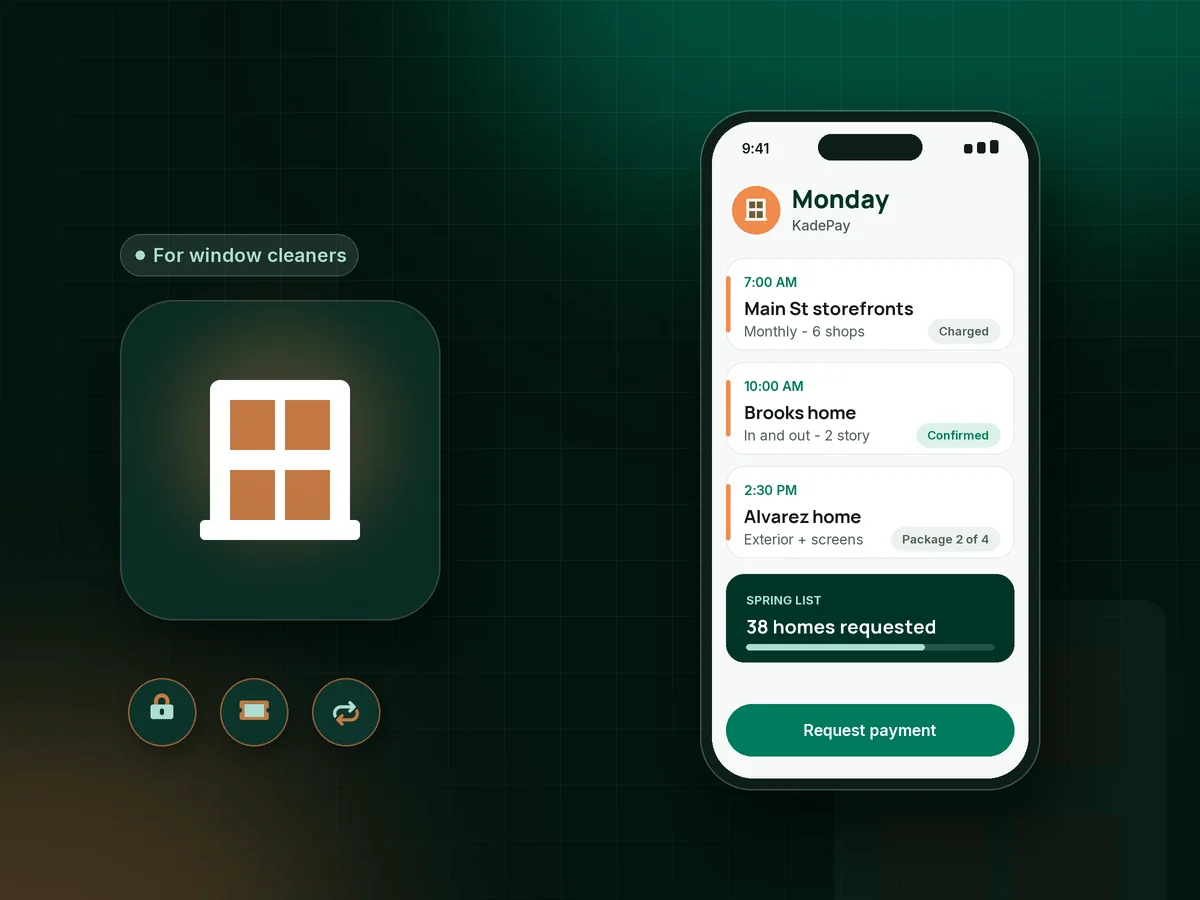
Illustration of a window cleaning business app with a cleaner's Monday of storefronts, a two-story home and a paid prepaid package visit

Sound familiar?

Streak-free glass, and still chasing the payment.

Window cleaning is repeat work: storefronts every month, homes every spring and fall. The payments around that work are where window cleaners lose time. Here is how KadePay handles the ones that come up most.

01

Exterior jobs finished with nobody home to pay

You clean thirty panes, wipe the sills and knock on the door. No answer, no check under the mat, and now you wait for a reply.

With KadePay

Have customers sign a work order that authorizes the card on file. When nobody is home, you charge the agreed amount after the job and the receipt reaches them by text.

Card on file
02

Storefronts that pay whenever the owner remembers

Six shops on Main Street, a few dollars each, every month. Collecting it door to door takes longer than the squeegee work.

With KadePay

Ask each shop to authorize a card or bank account, then on Team or Pro plans bill the monthly storefront rate on the same day. Every payment is listed in one place.

Recurring billing
03

Spring and fall regulars you forget to rebook

Last year's customers want their windows done again, but nobody remembers to ask until the leaves are already falling.

With KadePay

Sell a prepaid package of four seasonal cleans and record each visit as you use it. Customers request each visit from your booking link, and you confirm the date.

Packages and sessions
04

First-time customers who cancel on the morning

A big first clean blocks your whole day, and a no-show at 8 AM leaves your ladder on the truck and no work lined up.

With KadePay

Take a window cleaning deposit with a fixed-amount link when you confirm a large first job, and put your cancellation window in the agreement they sign.

Payment links and QR codes
05

Torn screens and hard water spots priced on the spot

You find three torn screens and mineral stains on the shower glass, and the customer wants to know what it costs before you start.

With KadePay

Text a bill for the add-on work with photos of the damaged screens attached. The customer approves and pays from the link, or you charge the authorized card.

Payment links and QR codes

How it fits your week

How a window cleaning week runs with KadePay

  1. Requests come in from the yard sign

    Homeowners scan your printed Flex Link, pick interior, exterior or both, and request a time. You confirm the slots that fit your week.

  2. Terms signed, card authorized

    Your work order covers ladder access, screens and the not-home policy. The customer signs it and authorizes a card for current and future bills.

  3. Access notes on every profile

    Private notes hold which side gate stays open, the second-floor bedroom with the stuck sash and where to park the truck.

  4. Paid whether or not they answer

    Charge the authorized card when you finish, tap a card on your phone if they are home, or text a bill with photos.

  5. Next season already sold

    Prepaid packages and automatic appointment reminders bring regulars back, and storefronts stay on monthly billing with Team or Pro plans.

Every way your customers pay

  • Visa
  • Mastercard
  • American Express
  • Discover
  • Apple Pay
  • Google Pay
  • Tap to Pay
  • ACH bank transfer
  • Affirm, where eligible
  • Venmo
  • Zelle
  • QR codes
  • Text and email links

Availability depends on your account setup and eligibility. You confirm Venmo and Zelle payments after checking they arrived.

KadePay for window cleaners

What to look for in a window cleaning business app

Window cleaning software comes in two flavors: big field service suites and simple payment apps. Most solo window cleaners sit in the middle. They need a window cleaning booking app for requests, a way to get paid when nobody is home and a clear record of which customers are due for their next clean.

Residential window cleaning payments are easier when the customer has authorized a card before the ladder comes off the truck. You charge it after the job, the receipt arrives by text, and the window cleaning invoice is closed before you reach the next street.

Storefront window cleaning billing works best on a fixed monthly rate. On the Team and Pro plans, KadePay charges each shop the same amount on the same day, and you stop collecting door to door. A screen repair invoice or hard water treatment goes out separately with photos attached.

Seasonal regulars are the backbone of a window washing business. A prepaid window cleaning package for spring and fall gives you money in the slow months and gives customers one less thing to remember. A window cleaning deposit on first big jobs protects your calendar from early-morning cancellations.

CLEAR ANSWERS

Window cleaning: your questions, answered.

What is the best window cleaning business app for a solo operator?

Choose one that handles booking requests, card on file for jobs when nobody is home, prepaid packages and simple storefront billing. KadePay covers those, takes cards with Tap to Pay on a compatible phone, and records Venmo or Zelle at no KadePay fee.

How do I get paid when the homeowner is not home?

Ask customers to sign a work order and authorize a card on file when they book. After the job, charge the agreed amount and they receive a receipt. If they prefer, text a bill with a payment link instead.

Can I sell prepaid window cleaning packages?

Yes. Create a package of several cleans that customers buy at once, then record each visit as you complete it. The package does not book visits by itself, so customers still request each date and you confirm it.

How do I bill storefronts every month?

On the Team or Pro plan, set up recurring billing at each shop's monthly rate, charged to the card or bank account the owner authorized. Shops that prefer invoices receive a bill they pay from the link.

Should window cleaners take a deposit?

Many take one on large first-time jobs or post-construction cleans, where a cancellation costs a full day. A fixed-amount payment link collects it when you confirm the date, and your signed terms explain how it is applied.

How much does KadePay cost for a window cleaning business?

For a one-person window route, Pay-As-You-Go starts at $0 per month; payment and usage fees apply. Monthly storefront billing needs Team at $10 per month or Pro at $35 per month. The KadePay pricing page has the current comparison.

YOUR WORK COMES FIRST

Make room for more customers.

Get started for free