Skip to content
KadePayGet started

KADEPAY FOR FOOD TRUCKS

The food truck payment app that keeps the lunch line moving.

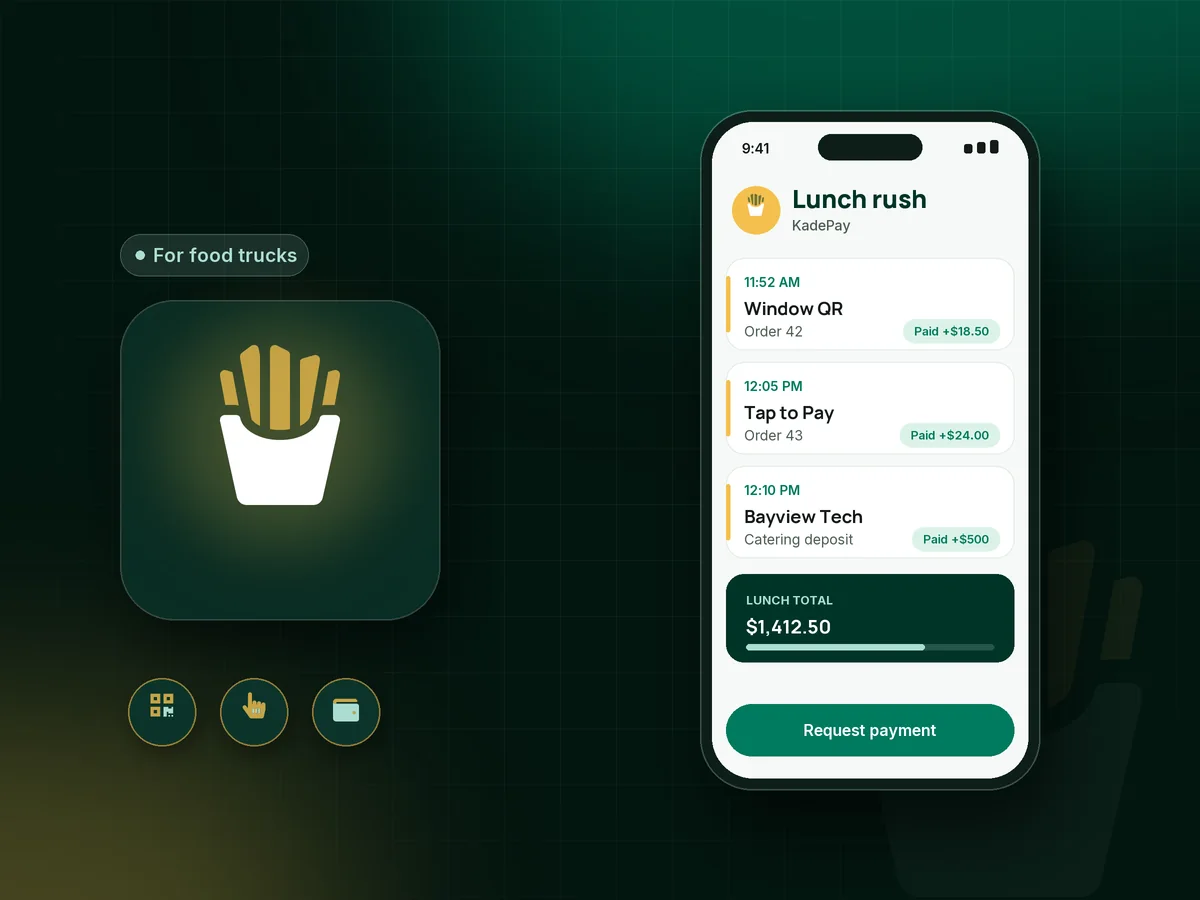
Twelve tacos, a line to the curb and a customer holding only a phone. KadePay lets people pay by scanning your QR at the window or tapping a card on your compatible phone, and it handles catering deposits, pop-up dinner tickets and gift cards from the same app.

Pay-As-You-Go starts at $0 per month. Usage and payment fees apply.

Illustration of a food truck payment app in KadePay with QR code payments at the window, a catering deposit and pop-up dinner tickets

Sound familiar?

The line is long. Payments should be the quick part.

Food truck owners cook, cashier, drive and post the day's location, often before 10 AM. These are the payment moments owners mention most, and how KadePay fits into a cramped serving window.

01

A card reader that dies at noon

The food truck card reader is at 8 percent, the Bluetooth keeps dropping, and twenty hungry people are waiting at the window.

With KadePay

Tape a printed Pay Direct QR to the window. Customers scan, enter the total you call out and pay by card, Apple Pay or Google Pay, and you confirm each payment in Transactions before handing over the order.

Ways to get paid
02

Customers who only carry a phone

More people walk up with a phone and no wallet, and every $14 order you lose because you only take cash adds up by Friday.

With KadePay

Use Tap to Pay on a compatible iPhone or Android phone with the KadePay app once payment setup is complete. Customers tap a card or phone wallet, with no separate reader to charge.

Tap to Pay and card readers
03

Catering dates held on a handshake

A company books you for a 150-person lunch, the date is held by text message, and they cancel two days before the event.

With KadePay

Send a food truck catering deposit as a fixed-amount link with questions for the event date and headcount, and put your cancellation terms in a short agreement form the client signs.

Payment links and QR codes
04

Balances due before the first plate

Your private event minimum is $1,200, and collecting the balance while you set up the generator is the worst possible moment.

With KadePay

Send the balance as a bill with reminders the week before the event. Corporate clients can pay by bank transfer, and you arrive knowing the event is paid in full.

Ways to get paid
05

Regulars asking for gift cards in December

Your most loyal customers want to give your birria as a present, and all you can offer them is a handwritten IOU.

With KadePay

Issue food truck gift cards from KadePay that regulars can buy for friends and coworkers. Recipients can find their gift card on your branded business page.

Payment links and QR codes

How it fits your week

A day on the truck with KadePay

  1. Post where you are parked

    Put one Flex Link in your social bio. It points followers to your catering request link, gift cards and upcoming pop-up dinner tickets, wherever the truck is today.

  2. Serve the lunch line

    Call out the total and let customers scan the window QR or tap on your compatible phone. Glance at Transactions to confirm each payment before the order goes out.

  3. Book the next private event

    A food truck private event starts as a request through your booking link, with its own location. Confirm the dates you can cover, then send the deposit link.

  4. Collect the balance before service

    A bill with reminders goes out a week ahead, so the balance is settled before you open the window at the wedding or office park.

  5. Close out for the bookkeeper

    Refund a mistaken charge in a few taps and download the day's transactions for your bookkeeper, with card and phone wallet payments in one list.

Every way your customers pay

  • Visa
  • Mastercard
  • American Express
  • Discover
  • Apple Pay
  • Google Pay
  • Tap to Pay
  • ACH bank transfer
  • Affirm, where eligible
  • Venmo
  • Zelle
  • QR codes
  • Text and email links

Availability depends on your account setup and eligibility. You confirm Venmo and Zelle payments after checking they arrived.

KadePay for food trucks

Do you need a food truck POS, or a food truck payment app?

A full food truck POS brings menus, kitchen screens and order tickets, and plenty of trucks run on one. Others keep orders on a whiteboard and just need a fast way to accept card payments at a food truck window. KadePay is that second kind: payments, deposits, tickets and gift cards, without a menu to maintain.

QR code payments shine during a rush. Customers pay on their own phone while you plate the next order, and you check the payment before handing it over. Tap to Pay on a compatible phone covers the customer who would rather tap a card.

Catering and private events are where trucks earn predictable money, and they deserve a paper trail. Take a deposit when you confirm the date, write your minimum spend and cancellation terms into a signed form, and bill the balance before the event.

Pop-up dinners and gift cards round out the year. Sell pop-up dinner tickets for a $65 five-course night with QR check-in at the door, and offer gift cards in December, when regulars want to share their favorite truck with everyone on their list. Both bring in money during the slow weeks, when the weather keeps the lunch crowd indoors.

CLEAR ANSWERS

Food trucks: your questions, answered.

What is the best food truck payment app for a small truck?

The best fit is fast at the window and handles the rest of the business too. KadePay gives you a printed QR and contactless payments on a compatible phone for the line, plus deposit links, balance bills, event tickets and gift cards for catering and private bookings.

How do I accept card payments at a food truck without a card reader?

Use the Pay Direct QR: customers scan, enter the amount and pay with card, Apple Pay or Google Pay. Or accept contactless payments on a compatible iPhone or Android phone after payment setup. Card readers are also available to buy if you want one.

How much deposit should a food truck take for catering?

Many trucks ask for 25 to 50 percent of the event total to hold the date, with the balance due before service. Send the deposit as a fixed-amount link, and put your minimum spend and cancellation terms in a form the client signs.

Does KadePay include a menu or online ordering?

No. KadePay does not build menus, take online orders, print to the kitchen or track ingredients. It handles the payment side: the QR and phone payments at the window, deposits and bills for events, tickets and gift cards. Keep orders on your board or ticket pad.

Can I sell gift cards for my food truck?

Yes. Issue business gift cards from KadePay that customers buy for friends, family or office prizes. Recipients can see their gift card on your branded business page, which they can add to their phone's home screen.

What does KadePay cost for a food truck?

Pay-As-You-Go has no monthly charge, starting at $0, and payment and usage fees apply. Team at $10 and Pro at $35 per month add staff logins, recurring bills and vanishing bills. The pricing page lists everything, and card readers are sold separately.

YOUR WORK COMES FIRST

Make room for more customers.

Get started for free