Skip to content
KadePayGet started

KADEPAY FOR SMALL LANDLORDS

A simple rent collection app for landlords with a few units.

You own a duplex and a couple of condos, and rent shows up by Zelle, Venmo, check and the occasional excuse. KadePay sends each tenant a clear monthly bill, lets them pay by bank transfer or card and keeps one payment history per unit, without turning you into a property management company.

Pay-As-You-Go starts at $0 per month. Usage and payment fees apply.

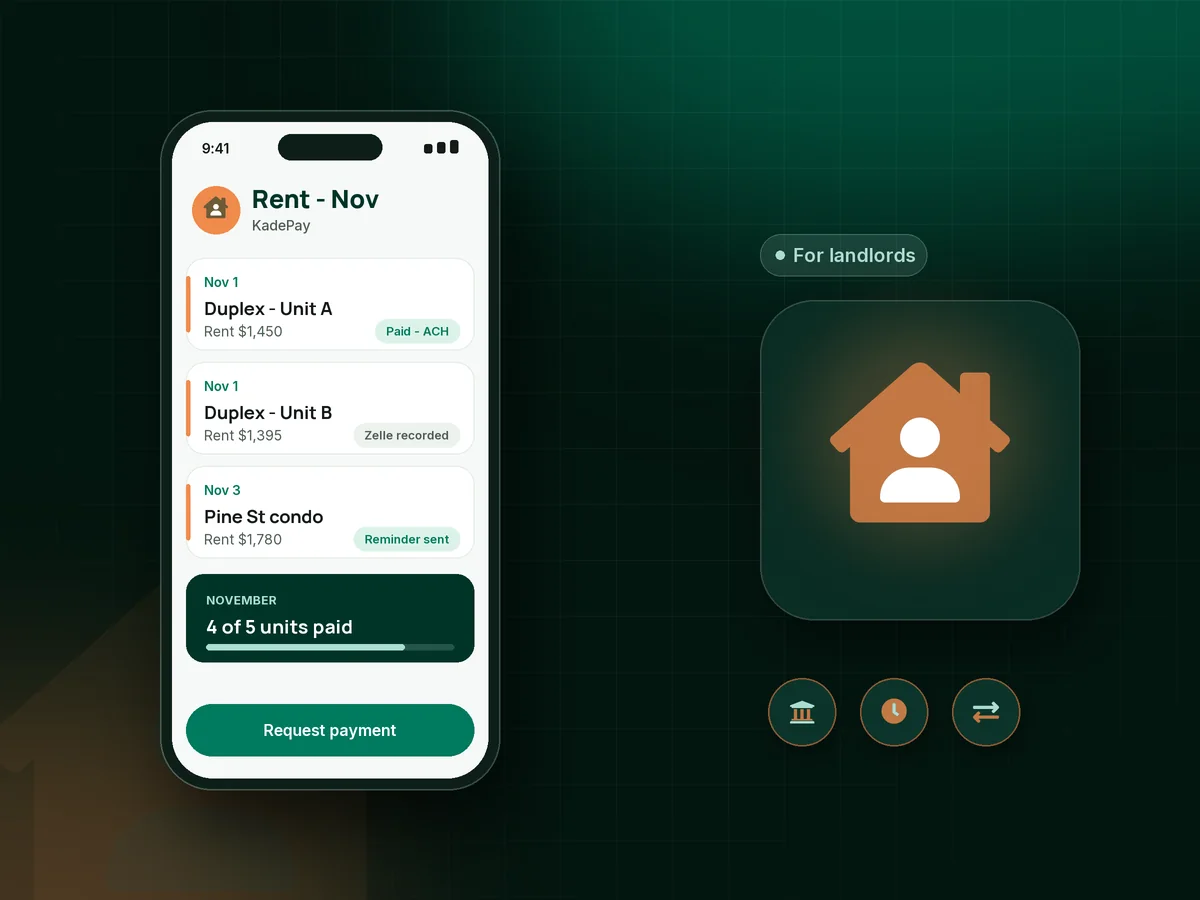
Illustration of a rent collection app showing a small landlord's units, an ACH rent payment, a reminder and a recorded Zelle payment

Sound familiar?

Rent day should not feel like a scavenger hunt.

Small landlords rarely need a full property management system. What wears you down is the first week of every month: checking five apps, sending awkward texts and trying to remember who paid what. KadePay keeps that part simple.

01

Rent arriving through five different apps

One tenant sends Zelle, one uses Venmo, one mails a check and one pays half now and half on the 15th. Your records are a screenshot folder.

With KadePay

Record Zelle and Venmo rent against each tenant's bill with no KadePay fee, and let other tenants pay by ACH or card from the link. Every unit gets one rent payment history.

Venmo, Zelle and cards
02

Texting tenants about late rent every month

It is the 4th, rent is late again, and you are writing the same polite message you sent last month.

With KadePay

Send each tenant a monthly rent bill with reminders before and after the due date. If your lease includes a late fee, send a bill for the amount your lease describes.

Ways to get paid
03

Setting up rent the same way every month

Twelve times a year you create the same bill for the same amount, for the same tenant who would happily pay automatically.

With KadePay

On the Team or Pro plan, set up recurring rent bills charged to the bank account or card the tenant authorized. Each tenant is notified when rent is charged and can revoke the authorization.

Recurring billing
04

Move-in money collected in three pieces

First month, the security deposit and a pet fee come in as a cashier's check, a Zelle and a promise.

With KadePay

Send one bill listing the first month, security deposit payment and pet fee, or share a fixed-amount link. Check your state's rules for holding deposits.

Payment links and QR codes
05

Move-in condition disputes when the lease ends

The tenant says the carpet stain was there before, and your move-in photos are somewhere on an old phone.

With KadePay

Have the tenant sign a move-in condition checklist on their phone and keep move-in photos in a Gallery folder on their profile, shared read-only.

Forms and signatures

How it fits your week

How rent runs with KadePay

  1. Move-in paid in one step

    Send the new tenant one bill for first month's rent, the security deposit and any pet fee, payable by bank transfer, card or phone wallet.

  2. Checklist and photos on file

    The tenant signs your move-in condition checklist on their phone, and your walkthrough photos go into a shared read-only folder.

  3. Rent on the same day each month

    Send a monthly bill with reminders, or on Team and Pro plans set up recurring rent charged to the bank account the tenant authorized.

  4. Every payment in one place

    ACH, card, recorded Zelle and recorded Venmo payments all sit in each tenant's payment history, ready to download for your accountant.

  5. Tenants see their own page

    Your branded business page shows each tenant their own bills and signed forms, and they can add it to their phone's home screen for next month.

Every way your tenants pay

  • Visa
  • Mastercard
  • American Express
  • Discover
  • Apple Pay
  • Google Pay
  • Tap to Pay
  • ACH bank transfer
  • Affirm, where eligible
  • Venmo
  • Zelle
  • QR codes
  • Text and email links

Availability depends on your account setup and eligibility. You confirm Venmo and Zelle payments after checking they arrived.

KadePay for landlords

Is a simple rent collection app enough for a small landlord?

Plenty of small landlord software bundles tenant screening, lease templates and maintenance portals. KadePay does none of those. It is a payments app that works well for rent: you send bills, tenants pay, and you see who has paid. If you already handle leases and repairs your own way, that may be all you need.

The easiest way to collect rent online is a monthly bill the tenant can pay from a link. ACH rent payments keep costs low for both sides, and on the Team and Pro plans you can set up recurring rent charged to an account the tenant authorized. Late rent reminders follow the bill without you writing a single text.

Some tenants will always prefer Zelle or Venmo. When tenants pay rent with Zelle, record the payment against their bill so your rent payment history stays complete. Others want to pay rent by credit card, and where permitted you can pass eligible card fees to them.

Move-in is where a clear record matters most. A move-in costs payment link covers first month, security deposit payment and pet fees in one step, and a signed condition checklist with photos protects both you and your tenant when the lease ends.

CLEAR ANSWERS

Landlords & rent collection: your questions, answered.

Is KadePay a good rent collection app for a landlord with a few units?

It fits landlords who want simple rent collection without a property management system. KadePay sends monthly bills with reminders, accepts ACH and cards, records Zelle and Venmo rent with no KadePay fee and offers recurring rent on Team and Pro plans.

Does KadePay screen tenants or manage leases and repairs?

No. KadePay is not property management software. It does not screen tenants, create leases, handle maintenance requests or manage evictions. It handles rent bills, payments, move-in payment links, signed forms and payment records.

Can tenants pay rent with Zelle or Venmo?

Yes. Tenants send rent from their own Zelle or Venmo app, and you record the payment against their bill in KadePay. There is no KadePay fee on recorded Zelle or Venmo payments, so confirm the money arrived before you record it.

How do I set up automatic monthly rent payments?

On the Team or Pro plan, ask the tenant to authorize a bank account or card, then create a recurring rent bill for the monthly amount. The tenant is notified of each charge and can revoke the authorization.

Can I collect a security deposit through KadePay?

Yes. Send a bill or fixed-amount link for the security deposit, first month's rent and any pet fee. Deposit rules vary by state, including where deposits are held and when they are returned, so check your local requirements.

How much does KadePay cost for a landlord?

For one or two rentals billed by hand, Pay-As-You-Go starts at $0 per month; payment and usage fees apply. Recurring rent needs Team at $10 per month or Pro at $35 per month. The KadePay pricing page shows the differences.

YOUR WORK COMES FIRST

Make room for more tenants.

Get started for free