Skip to content
KadePayGet started

KADEPAY FOR LANDSCAPING & LAWN CARE

Lawn care billing software for every mow, cleanup and install.

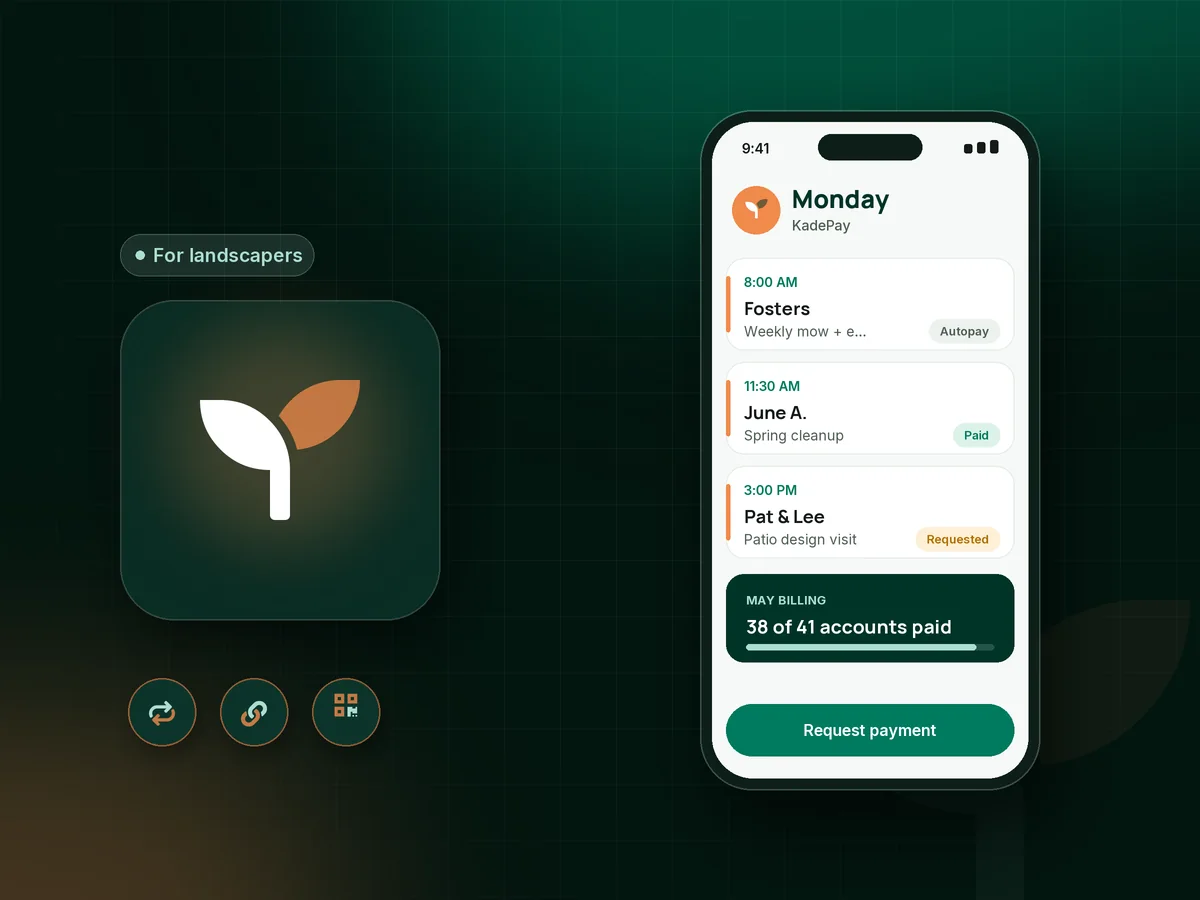
Forty yards a week, a spring cleanup list and a paver patio in June. KadePay bills the regulars on a schedule, takes deposits for design and install work, and lets customers pay by card, bank transfer or a QR on the trailer, so you are not knocking on doors with a clipboard on Fridays.

Pay-As-You-Go starts at $0 per month. Usage and payment fees apply.

Illustration of a landscaper's week in KadePay lawn care billing software with weekly mowing, a spring cleanup and a patio design deposit

Sound familiar?

You mow every week. They should pay like it.

Lawn and landscape money is mostly small, repeat amounts, plus a few big install jobs each season. These are the gaps where landscapers lose time and cash, and the KadePay feature that covers each one.

01

Forty customers, forty invoices, and five who never pay

Monthly invoices go out, most come back, and you spend the first week of every month chasing the same few accounts.

With KadePay

On Team or Pro, bill monthly lawn care as a recurring payment charged to the card or account each customer authorized, then check one list for the few who still owe.

Recurring billing
02

Mowing on credit for customers already 60 days behind

You keep cutting because stopping feels awkward, and by August the balance is bigger than the season is worth.

With KadePay

Put your late-payment and pause policy in a seasonal agreement the customer signs on their phone, with a card authorized on file so the fee your signed policy describes can be charged.

Forms and signatures
03

Paying for pavers and plants before the install starts

A $9,000 patio means a pallet of pavers, base gravel and an excavator rental, all due before the customer has paid anything.

With KadePay

Collect a landscape design deposit and a materials deposit with fixed-amount links, then bill the balance with progress photos attached when the patio is done.

Payment links and QR codes
04

Gate codes, dogs and sprinkler heads you learn the hard way

The new crew member does not know about the side gate latch, the dog in the back yard or the sprinkler heads hiding along the bed edge.

With KadePay

Private notes on the customer profile hold gate codes, pet warnings and irrigation notes. Gallery folders keep the property photos and the planting plan for the beds.

Customer profiles and notes
05

One-off customers who want to pay on the spot

A neighbor flags you down for a $75 cut and wants to pay right there, and you have no invoice ready and no card reader.

With KadePay

Show the printed QR on your trailer so they scan, enter the agreed amount and pay, or use Tap to Pay on a compatible phone. Venmo and Zelle can be recorded with no KadePay fee.

Ways to get paid

How it fits your week

A landscaping season with KadePay

  1. Sign-ups in late winter

    Share a Flex Link for spring cleanups and seasonal mowing. Customers request a first visit and sign your seasonal lawn care contract on their phone.

  2. Authorize autopay

    Each customer authorizes a saved card or bank method, and on Team or Pro their monthly lawn care billing runs on the schedule you set.

  3. Install work with deposits

    Patios, plantings and sod jobs get a deposit link before materials are ordered, and a final bill with before and after photos attached.

  4. Extras in the field

    Aeration, mulch or a storm cleanup is billed on the spot with Tap to Pay on a compatible phone or a bill texted from the trailer.

  5. Wrap the season

    Fall cleanups and leaf removal get their own bills, and you download transactions for your bookkeeper once the mowers are winterized.

Every way your customers pay

  • Visa
  • Mastercard
  • American Express
  • Discover
  • Apple Pay
  • Google Pay
  • Tap to Pay
  • ACH bank transfer
  • Affirm, where eligible
  • Venmo
  • Zelle
  • QR codes
  • Text and email links

Availability depends on your account setup and eligibility. You confirm Venmo and Zelle payments after checking they arrived.

KadePay for landscapers

Best lawn care app for billing: what lawn care billing software should handle

Lawn care is a subscription business whether you call it one or not. The same customers, the same days, the same amount every week from April to November. Lawn care billing software should treat it that way: one authorization, a monthly charge, and a short list of the few accounts that need a nudge.

On Team or Pro, KadePay runs monthly recurring billing against the card or bank method each customer authorized, and the seasonal agreement they signed explains the schedule and your pause policy. Customers who prefer to pay each visit can use a texted bill, Apple Pay, Google Pay, or Venmo and Zelle that you record.

Design and install work is different. A landscape install ties up cash in stone, plants and rentals, so a deposit link before the order and a final bill with before and after photos keep the job funded. To accept payments for lawn care extras in the yard, such as a $65 aeration add-on, use Tap to Pay on a compatible phone or the QR on your trailer.

When the season ends, download your transactions for the bookkeeper and start next spring with the same customer list and notes.

CLEAR ANSWERS

Landscaping & lawn care: your questions, answered.

What is the best lawn care billing software for a small crew?

Look for recurring billing, simple deposits and easy field payments. KadePay runs monthly autopay on Team or Pro, collects install deposits by link, takes Tap to Pay on a compatible phone and records Venmo or Zelle, with one record per property.

How do I set up lawn care autopay for my customers?

On Team or Pro, create a recurring payment for the customer, send it for authorization, and KadePay charges their chosen saved method on your schedule. Customers are notified and can revoke the authorization, so pair it with a signed seasonal agreement.

Should landscapers take a deposit on install jobs?

Most do for hardscape and planting work because materials are bought up front. Send a fixed-amount deposit link once the design is approved, order the stone and plants after it shows paid, and take it off the final bill.

How do I stop mowing for customers who don't pay?

Write a pause policy into your seasonal agreement and have every customer sign it on their phone. With recurring billing, you can see who is behind early and decide whether to pause service before the balance grows into a whole summer.

Can customers pay a lawn care bill with Venmo or Zelle?

Yes. They send the payment from their own Venmo or Zelle app and you record it against the bill, so your list of paid accounts stays complete. There is no KadePay fee on a recorded Venmo or Zelle payment.

How much does lawn care billing cost with KadePay?

Lawn crews can start on Pay-As-You-Go at $0 per month; payment and usage fees apply. Automatic recurring billing for mowing customers needs Team at $10 per month or Pro at $35 per month. The pricing page shows what each plan includes.

YOUR WORK COMES FIRST

Make room for more customers.

Get started for free