Skip to content
KadePayGet started

KADEPAY FOR MOBILE NOTARIES & SIGNING AGENTS

The mobile notary payment app for signings at the kitchen table.

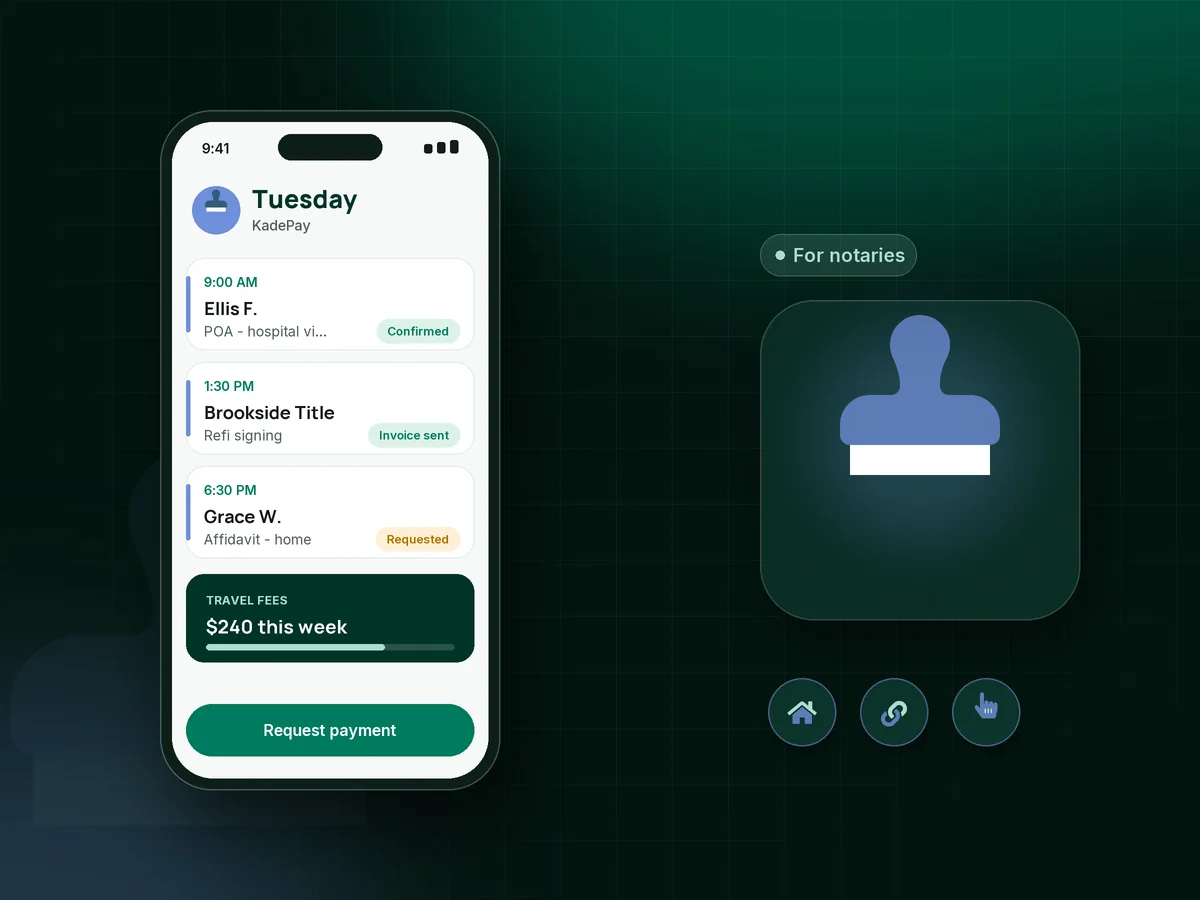
You drive to hospitals, homes and coffee shops, often on an hour's notice. KadePay takes the booking request with the signing address, sends the travel fee as a link, lets the signer pay with Tap to Pay at the table and invoices signing services for the loan packages they send you.

Pay-As-You-Go starts at $0 per month. Usage and payment fees apply.

Illustration of a mobile notary payment app showing signing requests at different addresses, a travel fee link and a Tap to Pay payment

Sound familiar?

You drove 40 minutes. Now you wait 45 days to get paid.

Signing agents and notaries doing general notary work run on gas, short notice and other people's schedules. These are the payment headaches notaries trade in their forums and groups, and how KadePay takes the edge off each.

01

Signing services that pay in 30, 45 or 60 days

The loan signing went perfectly, the scanbacks were on time, and the check is still somewhere in a title company's queue.

With KadePay

Send a loan signing agent invoice from your phone before you leave the driveway, with the confirmation attached and a due date. Reminders follow up until it is paid, and the company can pay by ACH instead of mailing a check.

Ways to get paid
02

Collecting the trip fee from a family in a hurry

A family needs a power of attorney signed at the hospital tonight, and you do not want to discuss the trip fee at the bedside.

With KadePay

Send a fixed-amount mobile notary travel fee link when you confirm the appointment, so the trip is settled before you start the car. Collect notarial fees at the signing, as your state allows.

Payment links and QR codes
03

Signers who cancel when you are already on the road

The borrower reschedules by text while you are halfway there, and your time and mileage simply disappear.

With KadePay

Put your notary cancellation fee in a policy form the client signs when booking, and ask them to authorize a card. If it happens, charge the fee your signed policy describes, where your state permits it.

Card on file
04

A signer with only a card and no reader in your bag

The signer has no cash, you have no card reader, and the nearest ATM is across town at 9 PM.

With KadePay

Accept card payments as a notary with Tap to Pay on a compatible iPhone or Android phone after payment setup, or show a printed QR code the signer scans to pay the agreed amount.

Tap to Pay and card readers
05

Appointments scattered across texts and voicemail

One request comes by text, another by voicemail, and the address for tomorrow's signing is buried in a thread from Saturday.

With KadePay

Share one booking link where clients request a time and enter the signing address. You review each request, confirm it, and every appointment keeps its own location on your calendar.

Appointment booking

How it fits your week

A signing day with KadePay

  1. Request with the address

    The client requests a time from your booking link and enters where the signing happens: home, hospital, office or cafe. You confirm what fits your day.

  2. Travel fee settled in advance

    A travel fee link goes out with the confirmation, and your cancellation policy form is signed with a card authorized for the fee it describes.

  3. Paid at the table

    After the notarizations, take the remaining payment with Tap to Pay on your phone, a QR code or a text link. The receipt goes straight to the signer.

  4. Signing services invoiced

    For loan signings, send a bill to the signing service with your fee breakdown and the confirmation attached, and let reminders follow up while you drive to the next one.

  5. Records ready for tax time

    Download your transactions for your bookkeeper, with travel fees, notary fees and signing service payments in one list instead of three apps.

Every way your clients pay

  • Visa
  • Mastercard
  • American Express
  • Discover
  • Apple Pay
  • Google Pay
  • Tap to Pay
  • ACH bank transfer
  • Affirm, where eligible
  • Venmo
  • Zelle
  • QR codes
  • Text and email links

Availability depends on your account setup and eligibility. You confirm Venmo and Zelle payments after checking they arrived.

KadePay for notaries

Choosing the best mobile notary payment app for your business

A mobile notary business earns its money twice: once from the public for general notary work, and once from signing services and title companies for loan packages. Each side pays differently, so the app you use has to handle a card at the table and an invoice with net terms.

How to get paid as a signing agent comes down to paperwork you send before you leave: a loan signing agent invoice with the fee breakdown and confirmation attached and a clear due date. Signing service payments still take time, but a bill with reminders is harder to lose than an emailed spreadsheet. When a company pays by ACH, the money moves without anyone printing or mailing a check.

For general notary clients, collect the mobile notary travel fee when you confirm and take the rest at the signing. Your state sets the notarial fee, while travel and convenience fees are usually yours to set and should be agreed in writing first. A signer who knows the trip fee up front rarely argues about it at the door.

KadePay handles mobile notary booking requests, payments and policy forms. It is not an electronic notarization platform or a notary journal, so keep your journal and any remote online notarization tools as your commission requires.

CLEAR ANSWERS

Mobile notaries & signing agents: your questions, answered.

What is the best mobile notary payment app for signing agents?

The right fit takes card payments at the table and invoices signing services from the same place. KadePay offers Tap to Pay on a compatible phone, travel fee links, booking requests with a different address per appointment, signed policy forms and bills with reminders.

How do mobile notaries charge a travel fee?

Your state sets the notarial fee, and in many states a travel fee is a separate charge that must be agreed in advance. Send it as a fixed-amount link when you confirm the appointment, and collect notarial fees at the signing so the signer sees each charge on its own.

Can I charge a notary cancellation fee if the signer cancels late?

If your state allows it, put the fee in a booking policy the client signs and ask for a card authorization. When a late cancellation happens, you charge the fee your signed policy describes, and the client receives a receipt.

How do I accept card payments as a notary without a card reader?

Use Tap to Pay on a compatible iPhone or Android phone with the KadePay app once payment setup is complete, or let the signer scan your printed QR code. You can also text a payment link before you arrive.

Does KadePay do remote online notarization or keep my notary journal?

No. KadePay is for booking requests, payments, policy forms and client notes. It does not perform electronic or remote notarizations and is not a notary journal, so keep using the journal and platforms your commission requires.

How much does KadePay cost for a mobile notary?

A notary who wants travel fee links and Tap to Pay can use Pay-As-You-Go at $0 per month; payment and usage fees apply. Team at $10 per month and Pro at $35 per month let a growing signing business add other notaries as team members and bill recurring work. See the pricing page for details.

YOUR WORK COMES FIRST

Make room for more clients.

Get started for free